
Every device you own,
one secure network
Remote desktop from any browser and a private WireGuard-style mesh between your machines — with team chat and video included.
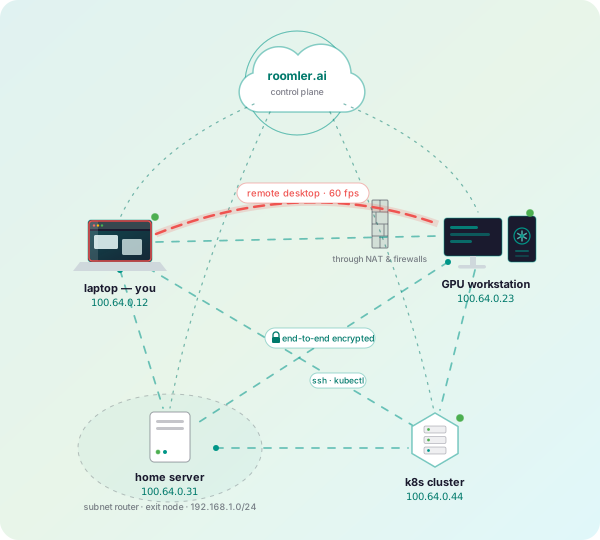
- Remote desktop
- Private mesh network
- Tunnels & SOCKS5
- Exit nodes
- MagicDNS
- Chat & video included
Reach any of your devices
A TeamViewer-style remote desktop that lives in your browser
Remote desktop in the browser
Hardware-encoded H.264/HEVC/VP9 with sub-100 ms input latency. No viewer install — any Chromium browser is the controller.
Works behind strict networks
Direct peer-to-peer when possible; TURN relays and WebSocket fallbacks punch through corporate firewalls and full-tunnel VPNs.
Fleet management built in
Enroll unattended machines, push updates from the web, transfer files and clipboard, and audit every session.
Your own private network
A Tailscale-style overlay mesh between everything you enroll
WireGuard-style mesh
Every device gets a stable private address. Traffic flows directly between machines with NAT hole-punching and encrypted end to end.
Subnet routers & exit nodes
Expose a whole LAN through one machine, or route all your traffic through a trusted exit node when you travel.
MagicDNS & tunnels
Reach machines by name, forward ports, and run SOCKS5 tunnels into networks only one of your devices can see.
Collaboration included
The team layer is part of every plan — not an add-on
Rooms, chat & threads
Organized rooms with threaded messaging, reactions, mentions and file attachments.
HD video conferencing
Built-in SFU for crystal-clear meetings with screen sharing and recordings.
Files, cloud & AI
File sharing with versioned uploads, per-room libraries and search.
Set up a device in minutes
Run the graphical installer or paste one command. Enrollment tokens come from your workspace (Devices → Enroll device).
Windows
Or from a terminal:
& ([scriptblock]::Create((irm https://roomler.ai/api/setup/install.ps1))) -Role daemon-system -Token <token> -Server https://roomler.aiLinux
Or from a terminal:
curl -fsSL https://roomler.ai/api/setup/install.sh | sh -s -- --role daemon --system --token <token> --server https://roomler.ai --name "$(hostname)"macOS
Or from a terminal:
curl -fsSL https://roomler.ai/api/setup/install.sh | sh -s -- --role daemon --token <token> --server https://roomler.ai --name "$(hostname)"Simple, per-user pricing
Every plan includes the private network and remote desktop. Start free, upgrade for more devices.
Take your devices with you
Free for up to 3 devices — remote desktop, private mesh, tunnels, chat and calls.
Not ready to sign up? Get an email when something notable ships.
The mailing list needs JavaScript; a free account gets the same news.
Product updates only, and never more than monthly. One-click unsubscribe in every email. We do not share your address. Privacy Policy