
Remote desktop
Remote desktop from any browser — open an enrolled machine as a live screen in a tab, hardware-encoded, end-to-end encrypted and consent-gated.
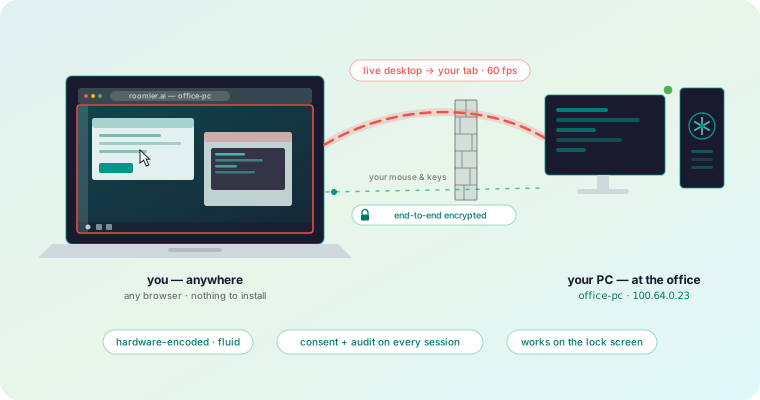
Any machine running the agent can be opened as a live screen in a browser tab. The viewing side installs nothing — the controller is a plain browser, on any operating system, including one that has never heard of Roomler.
How a session works
- You click View screen. The server checks you are allowed, and introduces the two ends to each other.
- The machine asks whoever is sitting at it — unless it is configured for unattended access.
- The two ends negotiate the fastest path that works: local network first, then a direct internet path, then hole-punching, then a relay.
- Video, input, clipboard and file transfer flow over that path. The server is out of the way and never sees the contents.
The last point is the one that matters most for privacy: the server’s role ends once the two ends can talk. It coordinates; it is never a data path.
What you can do in a session
Your first session
— Multiple monitors, quality control, keyboard handling and what the on-screen indicators mean.
Unattended access
— Reach your own machines without anyone approving at the far end.
Consent
— Who gets asked, on which surface, and what happens when nobody answers.
Codecs and performance
— Hardware encoders per platform, and what to change when it feels slow.
Files and clipboard
— Move files and clipboard contents in both directions.
Screen recording
— Record your own screen or a remote one in full quality, then cut it, speed it up and add music.
Per-OS permissions
— What each operating system makes you grant before capture works.
Requirements
| Side | Needs |
|---|---|
| Viewer | A current browser: Chrome, Edge or another Chromium browser works best; Safari and Firefox work too. Nothing installed. |
| Target | The agent, and whatever screen-capture permission the OS demands. |
Chromium browsers are the recommendation: the low-latency decode path the viewer relies on has had the most testing there. Safari and Firefox run the viewer too, with less testing so far.
In this section
Your first remote session
Open a machine's screen, switch monitors, control quality, send keyboard shortcuts, and read the connection indicator that tells you how you are connected.
Unattended access
Unattended remote access to your own servers and workstations — nobody approves at the far end, even at the Windows lock screen or before anyone logs in.
Consent
Who gets asked before a remote session starts, which surface the prompt appears on, and what happens when nobody is there to answer.
Codecs and performance
Which video codecs and hardware encoders Roomler uses on Windows, macOS and Linux — and what to change when a remote session feels slow.
Files and clipboard
Copy text between your machine and a remote one, and transfer files in both directions over the same encrypted peer-to-peer session.
Per-OS permissions
What Windows, macOS and Linux each require before screen capture and input injection work — and why a missing grant usually produces silence, not an error.
Screen recording
Record your own screen from roomler-desktop, or the screen of a machine you control from the viewer, in full quality, then cut it, speed it up and add music.