
System overview
The pieces of a Roomler deployment — agent, CLI, server and browser — and how a remote session travels through them without the server carrying it.
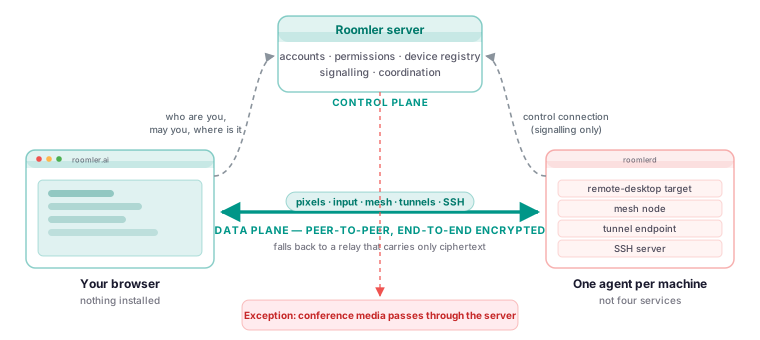
Four pieces, and the important part is which arrows are thick.
| Piece | What it is | Where it runs |
|---|---|---|
The agent (roomlerd) |
A native binary: remote-desktop target, mesh node, tunnel endpoint, SSH server | Every machine you enroll |
The CLI (roomler) |
Status, peers, tunnels, forwards, exec, ssh, diagnostics | The same machine |
| The server | Accounts, permissions, device registry, signalling, chat, conferencing | Our cloud, or yours |
| The controller | A browser (Chromium browsers work best; Safari and Firefox work too) | Wherever you are |
How a remote session actually happens
- You ask. The browser tells the server you want a device’s screen.
- The server decides. It checks your permissions, the organization’s settings and the device’s policy. A refusal ends here, with a reason.
- The server introduces. It passes each side what it needs to find the other, then steps out of the way.
- The machine asks its human — unless it is configured for unattended access.
- The two ends negotiate a path and connect directly, or through a relay if they must.
- Media flows between the two ends. The server is no longer involved and never sees the contents.
Step 3 is the whole design
Once the two ends can talk, the server’s job is over. It cannot see the session, because it is not in it. That is why “we do not look at your screen” is a statement about topology rather than a promise about behaviour.
The control connection
Each agent holds one long-lived connection to the server. Everything the server needs to tell a machine rides it: netmap updates, session invitations, configuration, update instructions.
That connection is the reason remote commands and SSH work when the mesh does not
Both ride the control connection rather than the mesh — deliberately, because the diagnostics you most want are the ones you need when the network is the broken thing.
What the server stores
Accounts, organizations, device rows, permissions, room and message contents, files you uploaded, and audit records. Not session video, not keystrokes, not the contents of your tunnels.
Scaling
The hosted service runs several server instances. Users, agents and rooms in one organization are grouped onto the same instance, because the session registries are per-instance; chat, presence and notifications are shared across instances.
A self-hosted deployment is a single instance, which is more than enough for almost everyone — the multi-instance topology is a Kubernetes arrangement rather than a compose file. See self-hosting.