
Private network
A WireGuard-style encrypted mesh between all your machines — stable private addresses, names, direct connections through NAT, tunnels, exit nodes and SSH.
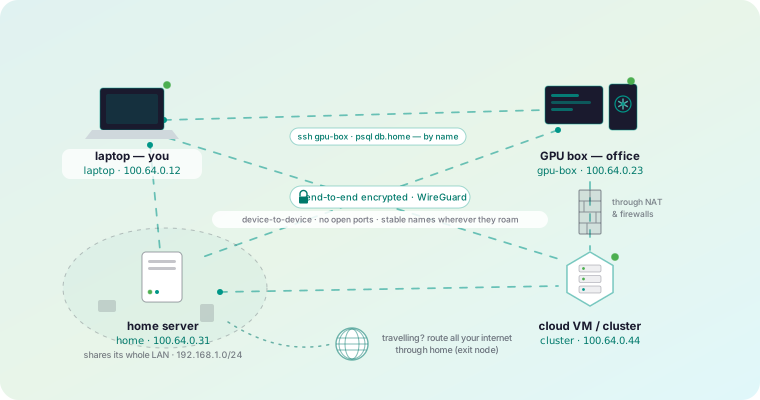
Every machine you enroll can also join a private encrypted mesh. Each one gets a stable private address and a name, and they talk directly to each other wherever they are — across NAT, across the internet, without opening a single inbound port on anything.
What you get
Addresses and MagicDNS
— Stable private addresses, and names instead of numbers.
How devices connect
— The path cascade: LAN, direct, hole-punched, relayed — and how to see which one you are on.
Subnet routers
— Expose an entire LAN through one machine.
Exit nodes
— Route all of a device’s internet traffic through a machine you trust.
Tunnels
— Forward a single port to a service on a remote machine.
SOCKS5
— A proxy into a network only one of your machines can see.
SSH
— A shell on any node, with no sshd and no open port.
Multi-org
— One machine in several organizations at once.
Ephemeral nodes
— Devices that remove themselves: CI runners, containers, autoscaled workers.
The two commands you will actually use
roomler status    # this machine: address, name, and how it is connected
roomler peers     # everything else on the mesh, and how each one is reached
roomler peers is the diagnostic. It names every peer, its address, and the
path currently carrying it — which answers “why is this slow?” faster than
anything else.
Turning it on
The mesh is part of the agent, not a separate install. On Windows and Linux it comes up with the agent. On macOS it needs the root half of the install, which is a second enrollment — see Install on macOS.
An organization can have the mesh switched off
A device can be perfectly connected to the control plane and still have no mesh
— they are separate things. roomler status prints both on one line for exactly
that reason, and an organization whose mesh is off is named in roomler peers rather than silently omitted.
What the server does, and does not do
The server hands each machine the list of peers it is allowed to reach, and helps two machines find each other. It never carries your traffic in the clear: when no direct path exists at all, the fallback relay forwards ciphertext it cannot read.
That is the whole trust model in a sentence, and architecture spells out the details.
In this section
Addresses and MagicDNS
How each machine gets a stable private address on the mesh, how names work instead of numbers, and what happens to an address when a device is removed.
How devices connect
The connection cascade — LAN, direct internet, NAT hole-punching, then relays — how Roomler picks a path, and how to see which one a pair is using.
Subnet routers
Expose a whole LAN through one enrolled machine, so your other devices can reach printers, NAS boxes, hypervisors and appliances that will never run an agent.
Exit nodes
Route all of a device's internet traffic through a machine you trust — with split-default routing designed so it can never lock you out of your own box.
Tunnels and port forwards
Forward a local port to a service on a remote machine — reach a database, an internal web app or an API without exposing anything to the internet.
SOCKS5 proxy
Run a local SOCKS5 proxy into a network only one of your machines can see — browse internal sites and reach many hosts without a forward for each one.
SSH without sshd
Get a real shell on any enrolled machine by its mesh address — with no sshd installed, no port bound and no firewall rule, on Linux, macOS and Windows.
One machine in several organizations
Put a single machine in more than one Roomler workspace at once — how identity, addressing and host-global settings behave when organizations overlap.
Ephemeral nodes
Devices that remove themselves — CI runners, containers and autoscaled workers that join the mesh on start and disappear cleanly when they stop.