
What is Roomler?
Roomler is a browser-based remote desktop and a private WireGuard-style mesh network on one self-hostable agent, with team chat and video included.
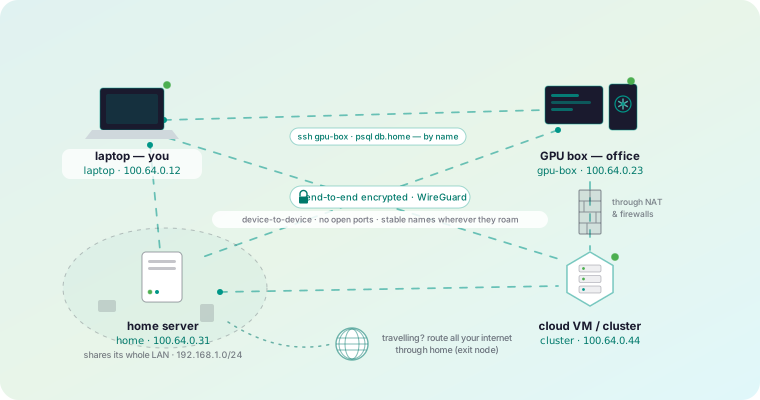
Most people arrive here already running two products: something like TeamViewer or RustDesk to see a screen, and something like Tailscale or a VPN to reach a service. Roomler is one agent that is both, plus the team layer, on one identity and one server you can host yourself.
 9:03
9:03The three pillars
1 · Desktop sharing and remote control
Any machine you enroll becomes reachable as a live screen in a browser tab. There is nothing to install on the viewing side — the controller is a plain browser, best in Chrome, Edge or another Chromium browser, and Safari and Firefox work too. Video is hardware-encoded where the hardware allows (H.264, HEVC, AV1, VP9), input is injected on the far end, and clipboard and file transfer ride their own data channels.
2 · Your own private network
Every enrolled machine also gets a stable private address on an encrypted overlay mesh, and a name you can use instead of the address. Traffic goes directly between machines whenever a path exists, hole-punching through NAT; when no direct path exists it falls back through relays, and it keeps re-attempting a direct upgrade rather than staying relayed.
On top of the mesh sit port forwards, a SOCKS5 proxy, exit nodes,
and SSH to a node that runs no sshd and has no open port.
3 · Collaboration, included
Rooms with threaded chat, reactions, mentions and file attachments, plus HD video conferencing with screen sharing. It is part of every plan rather than an upsell, because it runs on the same accounts and the same server.
Two invariants worth knowing up front
These two shape almost every design decision, and knowing them explains a lot of the product’s behaviour.
What runs where
| Piece | What it is | Where it runs |
|---|---|---|
The agent (roomlerd) |
A native binary — the remote-desktop target, the mesh node, the tunnel endpoint, the SSH server | Every machine you enroll |
The CLI (roomler) |
Status, peers, tunnels, exec, ssh, diagnostics | Same machine, alongside the agent |
| The server | Accounts, device registry, signalling, coordination, chat and the conferencing SFU | Roomler’s cloud, or your own |
| The controller | A browser (Chromium browsers work best; Safari and Firefox work too) | Wherever you happen to be |
What it is not
Being straight about this saves time:
- Not a screen-recording or session-recording product. Remote sessions are audited — who connected, when, from where — but the pixel stream itself is deliberately never stored server-side.
- Not a full MDM. You can enroll, update, configure and audit devices; you cannot push arbitrary software or manage OS policy.
- Not a public-relay service by default. A relay is a fallback for when no direct path exists, not the normal path.
Where to go next
Quickstart
— Workspace to first remote session in about five minutes.
Install on your OS
— Windows, macOS and Linux each have their own page.
Security model
— Exactly what the server can and cannot see.
Self-hosting
— One compose file, one published image.