
Tunnels and port forwards
Forward a local port to a service on a remote machine — reach a database, an internal web app or an API without exposing anything to the internet.
- network
- tunnels
- port-forward
- cli
- developers
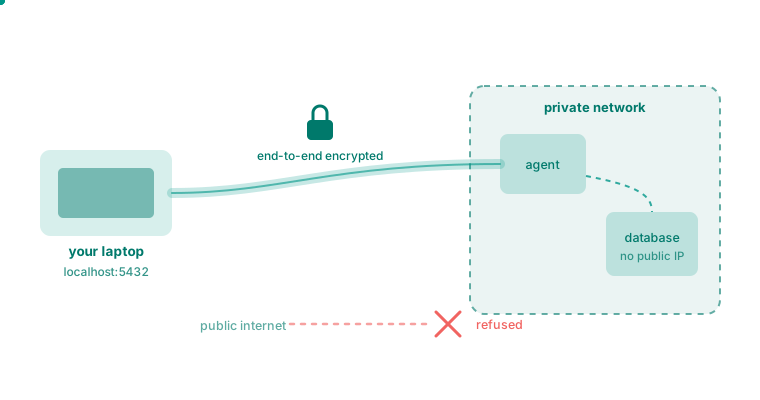
A tunnel forwards a port on the machine you are sitting at to a service on a machine somewhere else. The service does not have to be on the mesh, or even know Roomler exists — it just has to be reachable from the machine running the agent.
The shape of it
localhost:5432 -> [ your machine ] ==mesh==> [ remote agent ] -> db.internal:5432Nothing is exposed to the internet. The remote service keeps listening only where it always did.
Open one
roomler forward --agent <agent-id> --local 5432 --remote localhost:5432Then use localhost:5432 with any client you already have — psql, a GUI, an
ORM. Nothing needs to know about the tunnel.
The target is the device's **id**, not its display name
--agent takes the hex device id, which you can copy from the device’s page in
the dashboard. A friendly name is not resolved here, and passing one fails in a
way that looks like the device is missing.
The command stays in the foreground and tears the forward down on Ctrl-C. To
hand it to the local agent instead — so it survives the CLI exiting — add
--daemon, then manage it with:
roomler flows          # every flow the local daemon is running
roomler kill <flow-id> # stop one
`--remote` is the interesting flag
--remote localhost:5432 reaches a service on the remote machine itself.
--remote db.internal:5432 makes that machine a jump host to something else
it can reach — the database behind the office firewall, the appliance on an
isolated VLAN.
Permanent tunnels
For a forward you always want, declare it in the agent’s configuration instead of opening it by hand. The agent reconciles declared routes on every start, so the tunnel comes back after a reboot, and it backs off rather than hammering the server if one cannot be established.
roomler route add --agent <agent-id> --local 5432 --remote localhost:5432
roomler route ls
roomler route disable <id>
roomler route rm <id>
The tray and menu-bar companion exposes the same list, if you would rather click.
UDP as well as TCP
Both are supported. UDP forwarding is what makes DNS, game servers and some VPN protocols work through a tunnel rather than only web and database traffic.
Who is allowed to open one
A tunnel is an access-control decision, not a convenience
Every forward is checked against the organization’s tunnel policy before it is established. A machine cannot open an arbitrary path into a network just because it happens to be enrolled.
Policies name what may be reached, from where, and by whom, and every decision is recorded. See overlay ACLs and device policies.
Tunnel, SOCKS5 or SSH?
Tunnel
— One known port to one known service. The simplest thing that works.
SOCKS5
— Many destinations, chosen by the client at connect time. Good for browsing an internal network.
SSH
— A shell, file transfer, and forwards, on a machine running no sshd.
When a tunnel drops
Tunnels re-establish themselves when a path recovers. If one stays down:
roomler status
roomler peers      # is the far end reachable at all?
If the peer is not reachable, the tunnel is a symptom rather than the problem — start at cannot connect.