
Allow remote desktop through a firewall without inbound rules
- remote-desktop
- firewall
- ports
- network
- windows
- security
- teamviewer-alternative
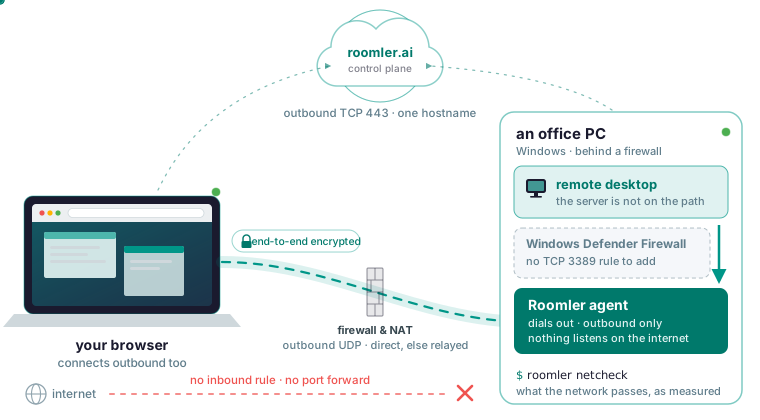
The short answer for whoever owns the firewall
You need no inbound rule on any machine and no port forward on the router or the perimeter, because the Roomler agent dials out. The firewall has to allow outbound TCP 443 to roomler.ai, or to your own server’s hostname, and outbound UDP to peers and relays for direct paths. Then you verify from the machine with roomler netcheck, which reports what the network passes as measured, rather than as assumed from the firewall’s configuration.
The agent’s list, from the ports and firewall page:
| Direction | What | Why |
|---|---|---|
| Outbound TCP 443 | To your server | The control connection, and the connectivity floor |
| Outbound UDP | To peers and relays | Direct paths and hole-punching |
| Inbound | Nothing | Both ends connect outbound; nothing listens on the internet |
The inbound row is empty because both ends connect outbound and meet in the middle. If you write the rule, or draft the exception request for whoever does, the allow-list is one hostname, roomler.ai or your own server’s, and it covers the API, the control connection, downloads, updates and the relay floor.
Why every guide says open TCP 3389, and when that is the right answer
The top results describe one procedure: enable Remote Desktop in Windows Settings, tick Remote Desktop under “Allow an app or feature through Windows Defender Firewall”, and make sure TCP 3389 is open, sometimes with a port forward on the router. For Windows’ own Remote Desktop that is correct, and it has two advantages: nothing extra is installed on the target, and on a LAN or domain network whose firewall you control, that one rule is all it needs. Roomler asks for more up front, because the target runs an agent and the viewer needs a current Chromium-based browser.
The inbound answer runs out where an inbound rule is unavailable or unwise: a home connection behind CGNAT, a laptop on hotel Wi-Fi, a corporate perimeter you do not administer, or a server you would rather not have listening on the internet. The Roomler docs answer “does it work behind a corporate firewall” with usually yes, because agents need only outbound access and never an inbound port, and the same property covers the other three.
How an agent that dials out crosses a firewall
The first of the agent’s two outbound connections is the control connection: each agent holds one long-lived connection to the server, and netmap updates, session invitations, configuration and update instructions ride it. The second is the session itself: when you click View screen, the server checks your permissions, introduces the two ends and steps out of the way; the ends negotiate a path, connect directly or through a relay, and media flows between them with the server no longer involved.
The path comes from a ladder, described on how devices connect and tried in this order:
- Same LAN: both machines sit on one local network and use it.
- Direct across the internet: one or both ends is reachable at a public address.
- Hole-punched: both are behind NAT and open a path through it together, the common case, and it works far more often than people expect.
- Relayed: no direct path exists, so traffic goes through a relay that only ever sees ciphertext.
- The floor: every UDP path is blocked, and the mesh still runs over TLS on port 443.
Every rung is initiated outbound from both ends, which is why the inbound row reads “Nothing”.
Allow remote desktop through Windows Defender Firewall: nothing to add
On Windows the agent runs as a service under LocalSystem or as a scheduled task, depending on the install mode, and only the system service reaches the lock screen and the pre-logon desktop. For a server or an unattended workstation choose the system service mode, -Role daemon-system on the Windows install page, which recommends it whenever you are unsure.
No mode needs an inbound firewall rule, and neither does SSH, which binds nothing. The SSH server intercepts traffic below the socket layer, so off the mesh there is no port for a rule to close. So the Remote Desktop checkbox under “Allow an app or feature through Windows Defender Firewall” can stay unticked unless you also use Windows’ own Remote Desktop: it opens TCP 3389 for that feature, and the agent needs no inbound rule. Windows Defender Firewall permits outbound connections by default.
Confirm from the machine:
roomler statusA healthy machine reports its version, its organization and that its control connection is connected. If endpoint protection blocks the download, allow-list roomler.ai and retry; installers are served through the server’s own origin, so one hostname is enough. Every Windows binary is signed with Authenticode, the evidence a security team usually wants before it grants an exception.
What happens when the network allows only 443
The ports page reduces a restrictive network to three rows:
| Situation | Result |
|---|---|
| Outbound 443 only | Everything works; paths are relayed rather than direct |
| Outbound UDP permitted | Direct paths become possible |
| Outbound 443 blocked | Nothing works; this is the minimum |
If you can allow one thing, allow outbound UDP: it is the difference between relayed and direct, which for remote desktop is the difference between usable and pleasant.
The first row holds because of the floor: with every UDP path blocked, the mesh still runs over TLS on port 443, the one port that survives essentially every corporate network because blocking it blocks the web, so connectivity degrades in quality rather than in availability. A relay works, but it is slower, with its bandwidth capped. It forwards bytes it cannot decrypt, so a relay hop costs performance and leaves privacy untouched.
A relayed pair does not settle there, either: it keeps re-attempting a direct path permanently, and an upgrade is make-before-break, so when the admin later allows UDP the pair moves to a direct path without a restart and without interrupting a live session.
Verify what the firewall actually allows through
Run these from the machine behind the firewall, in this order:
curl -sI https://roomler.ai/health     # or your own server
roomler netcheck                       # what this machine can actually reach
roomler peers                          # which path each peer is on
The curl against the health endpoint proves outbound 443 to the server, and the install problems page calls a failure there a network problem: proxy, firewall, DNS or captive portal.
roomler netcheck is the one to read on a restrictive network: it reports reachability, the relay verdict, floor health and NAT class, each measured from this machine. roomler peers lists every peer with its live connection type, and the session window shows the same thing as a LAN / Direct / Relay indicator, where LAN is the same local network, Direct is straight across the internet, and Relay means higher latency and capped bandwidth.
Read roomler status alongside them: it prints the control connection and the overlay state on one line, because an agent can be connected to the control plane with no mesh at all. And roomler peers lists an organization whose mesh is off by name, so an empty-looking list is never ambiguous.
When it still says Relay
The causes, in the order the cannot connect page gives them:
- A VPN client on one end is the most common cause: corporate VPN clients capture local network ranges, so two machines on the same physical network show Relay while every surface reports normally. Disconnect the VPN on one end and the pair converges to direct within about a minute, unless an enterprise client reaps routes and holds it there.
- Symmetric NAT on both ends makes hole-punching impossible, so a relay is the right answer; some mobile networks and a few corporate firewalls do this.
- UDP blocked outbound leaves the mesh working on the floor and never direct; if a machine works everywhere except one office, this is usually why.
- One end just moved: roaming between networks means a period of re-convergence that resolves within a minute or so.
Three commands from the CLI reference tell them apart:
roomler why <peer>
roomler diag host                  # evidence bundle from one device
roomler diag pair <other-agent-id> # both ends, side by side
roomler why says which tier was eligible for that peer, what it scored, and whether a hold-down is overriding the ranking. roomler diag host collects adapters, routes, firewall posture, carrier state and recent warnings on the target, and diag pair does both ends side by side, which a firewall question needs because connectivity is a property of the pair.
The one inbound port, and only on a relay you run
A machine acting as a relay for others listens on UDP 3478 by default; that is an inbound port on that one machine, only if you deliberately enable relaying on it, and no other machine needs anything inbound. Keep 3478: it is the port the symmetric-NAT corporate population was measured to reach, and higher-numbered alternatives were not, so a random high port will not work equally well.
Relaying is gated by an organization mode that is off by default, an access rule making the relay visible to each party, a per-device approval needing two permissions, and the machine’s own opt-in, which the server cannot push. On the device the key is relay_server_enabled. The point of one is to keep relayed pairs on your own hardware, bandwidth and tenancy. Turning it on moves nothing by itself; it engages on a path change, so restart one of the two machines to test it.
If you self-host, the server’s list is different from the agent’s
The server’s table has four rows, and the two internal ones stay off the internet:
| Port | Protocol | For | Exposure |
|---|---|---|---|
| Your HTTP port | TCP | API, web app, control connections, the relay floor | Behind your TLS terminator |
| The RTC range | UDP | Conference media | Reachable from participants |
| Database | TCP | The application only | Internal |
| Object store | TCP | The application only | Internal |
Remote desktop, tunnels, SSH and the mesh run peer to peer with a relay fallback, so a reverse proxy in front of the HTTP port does not get in their way. Conference video is the one part a proxy cannot fix, as the self-hosting page puts it: browsers send media straight at the address the server announces, on a UDP range, and the symptom of getting that wrong is perfect signalling with no video. No agent needs that range. A separate TURN server is not on the critical path: the built-in relay floor over the API’s own port already guarantees connectivity.
Agents enrolled against your server allow-list your hostname instead of roomler.ai, and the health check targets it:
curl -sI https://roomler.ai/health # or your own serverWhat the firewall admin is trusting the server with
The server holds accounts, device rows, permissions, audit records and chat, and it does not hold session video, keystrokes, tunnel contents, SSH bytes or mesh traffic. That is structural: its job ends once two machines can find each other, after which it is not on the path, and when traffic falls back to a relay, the relay forwards ciphertext it cannot decrypt. Browser to server and agent to server are TLS, while the remote-desktop session, mesh traffic, and tunnel and SSH payloads are encrypted end to end between the endpoints. That covers remote desktop, the mesh, tunnels and SSH; conference media is the documented exception, because a multi-party call needs a forwarding unit. See what the server can and cannot see: What the server sees.