My wife’s swearing at TeamViewer made me build my own remote desktop tool with extras
An open-source, self-hosted TeamViewer alternative that runs in any browser tab
- teamviewer
- remote-desktop
- self-hosting
- open-source
- unattended-access
Full disclosure: The story, and the swearing, are 100% human. An AI assistant helped me build Roomler and did minor corrections on the post itself.
😵💫 The Pain
It’s Friday night, I’m doing AI-assisted coding to the software engineering projects I’m working on.
My wife is sitting next to me and doing her financials/accounting work on a remote corporate machine via TeamViewer.
Next thing you know, I hear hot, spicy & juicy swearing. Something among the lines:
“Oh, god damn it, not again?” and bunch of F-words 🤬. And then some more F-words 🤬🤬🤬.
I asked her. What happened?
She goes on explaining to me, that she usually receives a TeamViewer one-time-password from her colleague, to access a corp-machine remotely (which has a single license to some accounting software). Then she logs on to it and does her work remotely.
This time however (as many other times), has accidently closed the TeamViewer session and with it she lost the opportunity to finish her important work that night. No one was there at that time at the remote machine, that could send her another one-time password. Had to wait till Monday.
“There must be a better way “ — she says
⚡That hit me like a thunder.
“I’m sure there is” — I say
🌱 The Seed was planted
Next thing you know, I open up Claude Code and start writing a detailed prompt about building cross-platform (Win, Linux, MacOS) Rust-based remote desktop tool with hardware encoding (GPU-enabled) for unattended and consent-based access, for fleet of machines that can be accessed via browser (WebRTC and WebCodecs API).
I had built video conferencing tools before. In 2020 I wrote here about the first Roomler, “Slack on Crack”, a self-hosted team chat with WebRTC video conferencing (Building your own Slack).
It shouldn’t be that different, right?
Underneath, a remote desktop is the same machinery pointed one way: the controlled machine encodes its screen as a video stream, the browser decodes it, and the mouse and keyboard travel back in the other direction.
Well, it turns out, that there is a lot more to it, than I initially thought.
- Lock-Screen: Remote control works on the lock screen (SystemContext), UAC dialogs, and admin apps. Requires admin (UAC prompt).
- Windows: DXGI (Desktop Duplication) · WGC (Windows Graphics Capture)
- MacOS: CoreGraphics (CGDisplayStream)
- Linux: X11 (XShm) · Wayland via DRM/KMS scanout, or PipeWire and the XDG Desktop Portal
- Encoders: H.264 · H.265 · VP8 · VP9 · AV1 and their Backends: NVENC · QSV · AMF · VideoToolbox · VAAPI · D3D12 · Vulkan · Media Foundation · openh264 · libvpx
- Chroma: 4:4:4 · 4:2:0 (how much color the bitstream keeps)
Fast forward 7 months, and an open source (self-hostable) remote control tool Roomler-AI is live and used by dozens of users. My wife and few of her colleagues being the first users of it.
What it looks like today:
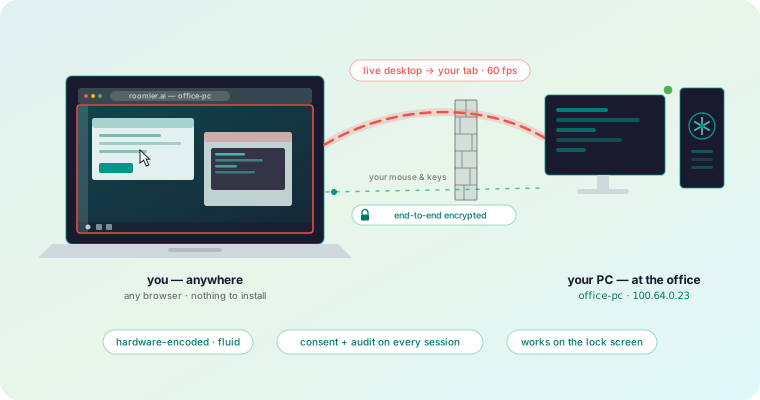
- Daemon: a small native installable daemon/agent program on the controlled machine, written in Rust, for Windows, macOS and Linux
- Browser tab: the viewer, the person connecting installs nothing and the video goes peer to peer over WebRTC, through a TURN relay when a network leaves no other way
- Control plane: the server introduces the two ends and checks who is allowed; it never sees a pixel or a keystroke
🚀 The Journey
The video turned out to be the easy part, but these took the time.
🔒 The lock screen
Windows draws the login screen on a separate, secure desktop, and an ordinary program can neither see it nor type into it. TeamViewer can, so this had to as well. The daemon runs as a Windows service, and a dedicated input thread attaches itself to that secure desktop, so the password box and the UAC prompts work from the browser too.
🤝🏻 Consent vs unattended remote access
If someone is sitting at the machine, they should see who wants in and click Allow. That prompt took longer to get right than the video did. It has to appear on Windows, macOS and Linux, from a background service that often has no desktop of its own. So there is a chain of places to show it: a native panel, then the tray app, then a command-line fallback. When none of them exists, the daemon reports that there was nowhere to ask, instead of quietly refusing.
Auto-consent is the default for self-controlled hosts, so your own machines never make you wait. It can also be enabled/disabled any time by the device owner.
🚨 Corporate antivirus
My wife as an accountant accesses corp-machines that belong to someone’s IT department via VPN. Their antivirus blocked installers downloaded from GitHub, so every installer now streams through roomler.ai, a single domain an allow-list can name. The Windows installers are code-signed as well, because an unsigned installer means a SmartScreen warning, and a SmartScreen warning usually means a ticket to IT Security Team.
💥 Speed
The agent encodes on whatever GPU the machine has, which became its own long story. The browser side had a surprise of its own: Chrome’s standard video element keeps roughly 80 ms of jitter buffer no matter what you ask of it. So the viewer can skip that element entirely. The encoded frames arrive over a WebRTC Data Channel, and a WebCodecs worker paints them straight onto a canvas.
⚡Why hardware encoding
A remote desktop sends a live screen at up to 60 frames per second, and every frame goes through the encoder before it goes anywhere. A GPU has a dedicated block for exactly that job, which keeps the work off the CPU the person at the machine is using.
Text is the other reason. Most video keeps only a quarter of the color detail (4:2:0), which smears the edges of colored text; 4:4:4 keeps it sharp, and only some encoders can produce it.
🎞️ Why FFmpeg
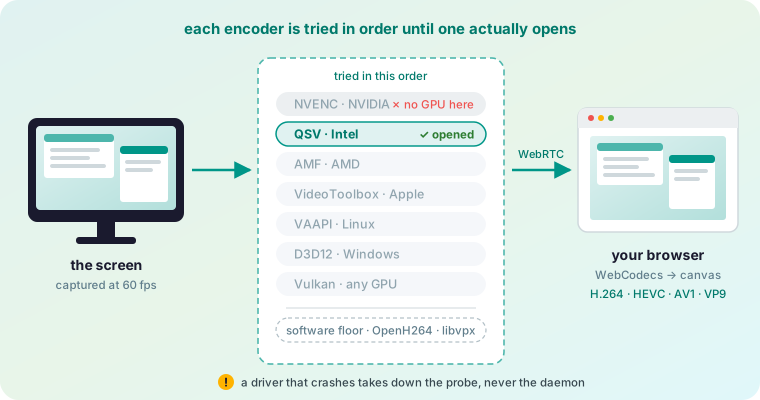
Every GPU vendor has its own encoder API, and each operating system adds another. FFmpeg puts NVIDIA’s NVENC, Intel’s QSV, AMD’s AMF, Apple’s VideoToolbox, VAAPI on Linux, D3D12 on Windows and the cross-vendor Vulkan video behind one interface, so one code path can try them in a fixed order: the vendor SDKs first, then VideoToolbox, then VAAPI, D3D12 and Vulkan. On Windows, Media Foundation gets the first go at H.264, and OpenH264 and libvpx sit underneath everything as software floors.
If nothing opens, you still get a picture.
💰Enough talks! Show me the money!
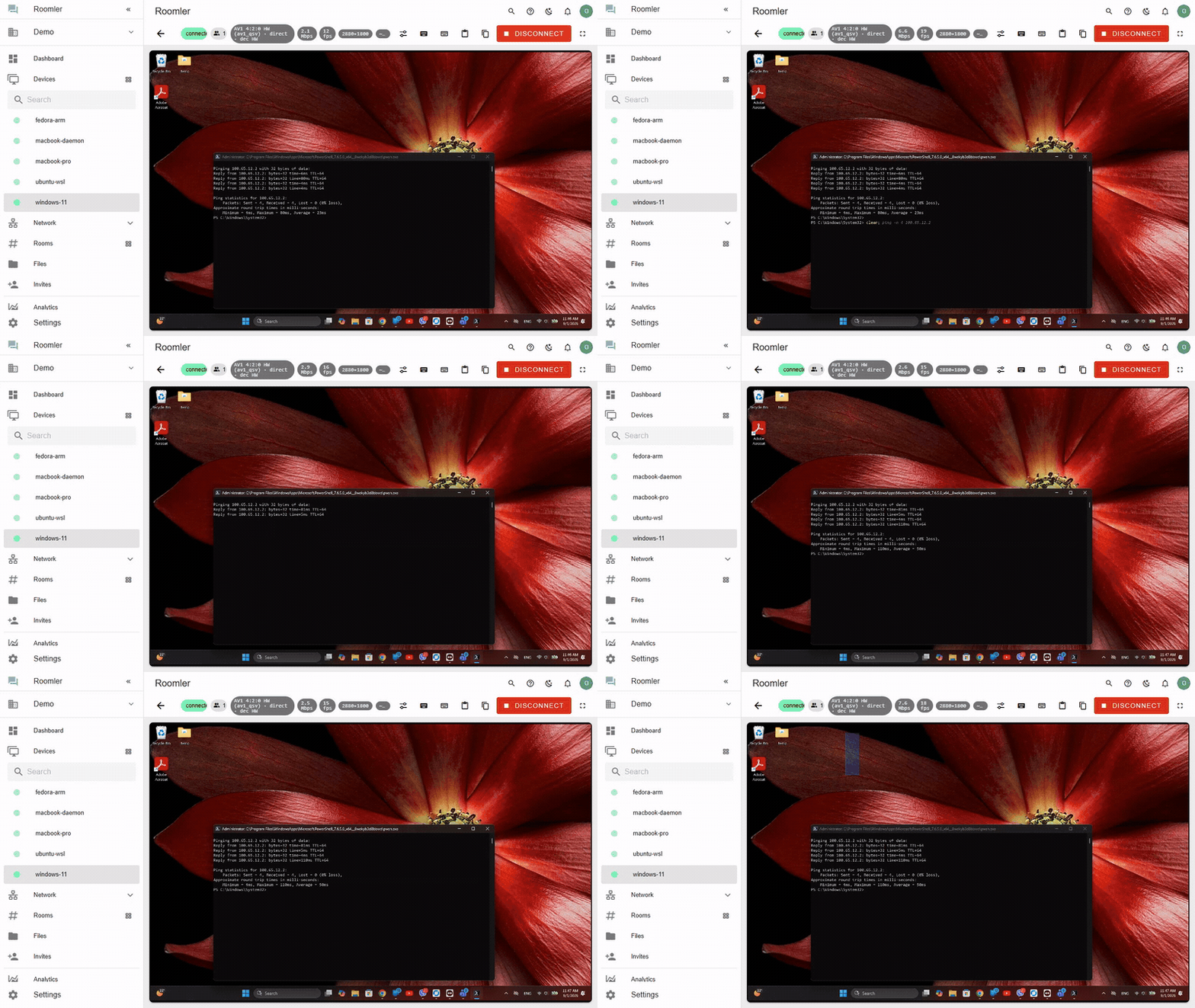
Here is a short demo preview.
👀 Try it out — remote desktop from your browser
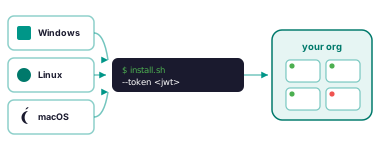
Here is the complete Getting Started guide for all supported platforms.
▶ Run it self-hosted with Docker Compose
Self-hosted — unlimited devices, no licence key, no activation, no phone-home. Same code as the hosted service; there is no crippled community build.
git clone https://github.com/gjovanov/roomler-ai.git && cd roomler-ai
cp .env.selfhost.example .env.selfhost      # fill in 4 values; 2 are `openssl rand -hex 32`
docker compose -f docker-compose.selfhost.yml --env-file .env.selfhost pull
docker compose -f docker-compose.selfhost.yml --env-file .env.selfhost up -d
🧩 ️Plugins & Add-ons — The Extras
- Secure Mesh Network: To the daemon, that is installed on the remotely controlled machine, optionally (via Rust compile time features) you can inlcude a private WireGuard-style mesh between your machines. Think of it Tailscale- or Netbird-Alternative (see: how it compares to Tailscale; how it compares to Netbird) — more about it in the upcoming posts.
- Team Collaboration — Video Conferencing & Chat: To the control plane server, there is optional plug&play team collaboration feature — video conferencing & chat — more about it in the upcoming posts.
3️⃣ The three pillars
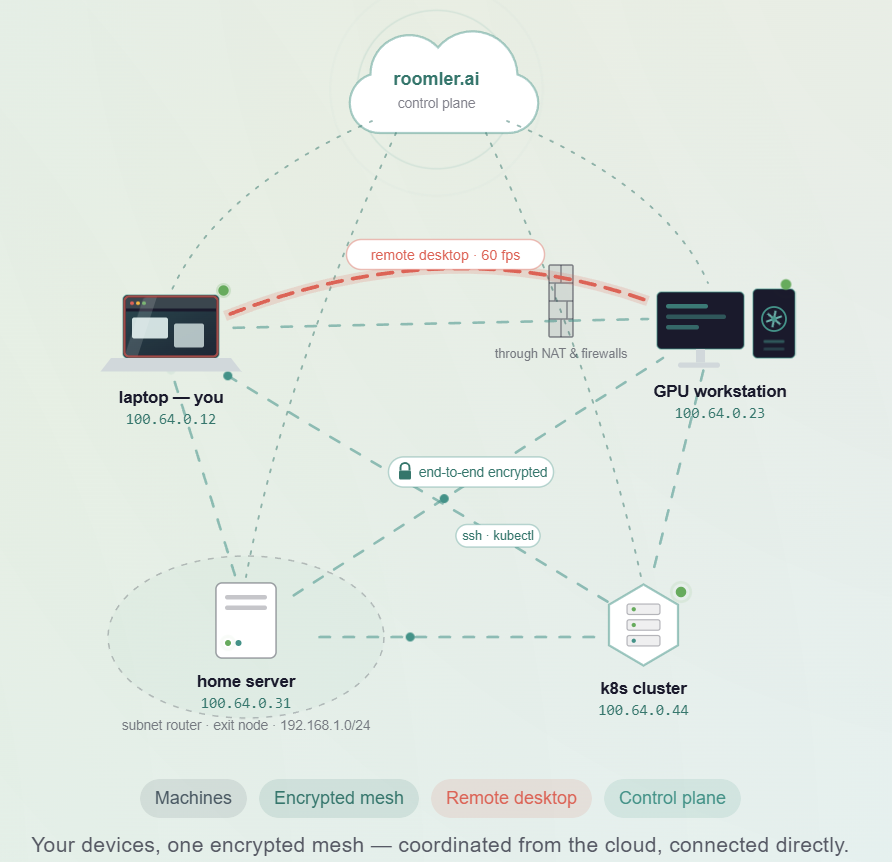
1 · Desktop sharing and remote control
Any machine you enroll becomes reachable as a live screen in a browser tab. There is nothing to install on the viewing side — the controller is a plain Chromium browser. Video is hardware-encoded where the hardware allows (H.264, HEVC, AV1, VP9), input is injected on the far end, and clipboard and file transfer ride their own data channels.
2 · Your own private network
Every enrolled machine also gets a stable private address on an encrypted overlay mesh, and a name you can use instead of the address. Traffic goes directly between machines whenever a path exists, hole-punching through NAT; when no direct path exists it falls back through relays, and it keeps re-attempting a direct upgrade rather than staying relayed.
On top of the mesh sit port forwards, a SOCKS5 proxy, exit nodes, and SSH to a node that runs no sshd and has no open port.
3 · Collaboration, included
Rooms with threaded chat, reactions, mentions and file attachments, plus HD video conferencing with screen sharing. It is part of every plan rather than an upsell, because it runs on the same accounts and the same server.
📢 Where it stands
Roomler is open source, AGPL-3.0 for the server and MPL-2.0 for the agent, and you can host it yourself with no device limit. The server is AGPL-3.0; the agent that runs on your machines is MPL-2.0. See LICENSING.md for the split and what it means if you intend to offer it as a service.
Development is heavily AI-assisteted with Claude Code and covered with automated e2e testing with throwaway VMs.
The same agent is also the remote desktop. It’s young and has few dozens users. The access-control policies are built and tested, but I haven’t yet run a real network with them fully enforced, and that’s the next thing I want to prove.
I would love to hear what your experience with Roomler and what can be improved.
If you liked what you have read and seen, then as they say:
Give the devil his due!
Hence I would appreciate if:
- Clap & share this post with your friends
- Star it on github
- Share your experience with Roomler (how it has benefited you)
- Report any issue found on github
Talk to you soon!