
What a DERP relayed connection means and how to go direct
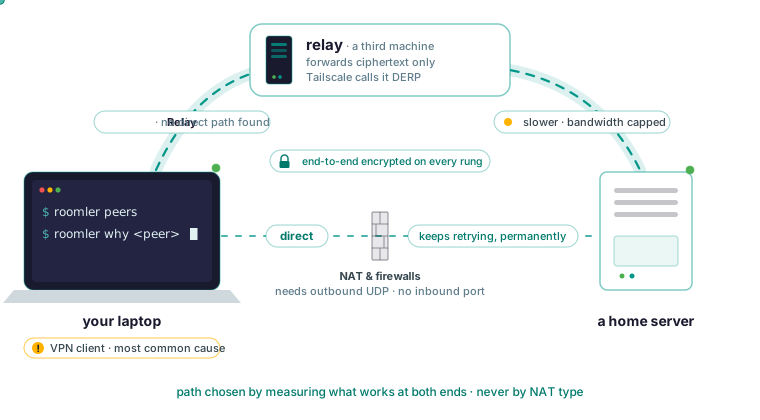
What a DERP relayed connection means
DERP is Tailscale’s name for its relay servers; Tailscale’s own documentation expands it as Designated Encrypted Relay for Packets. A relayed connection means your two machines could not open a direct UDP path to each other, so packets that were already encrypted on the sending machine are being forwarded by a third one. The cost is latency and bandwidth. Privacy is untouched, because what the relay forwards is already ciphertext. The search results stop there. What they leave out is why your pair landed on a relay, in the order the causes occur, and how to get it back to a direct path.
Every WireGuard-style mesh climbs the same ladder. In Roomler the rungs are the same LAN, direct across the internet, hole-punched through both NATs, relayed, and a floor over TLS on port 443. The rung is chosen by measuring what works at both ends, never by classifying the NAT type. The connection cascade page’s line is “heuristics may detect; they never decide”: VPN clients capture address ranges, and a symmetric-NAT guess is wrong often enough that acting on it strands pairs that would have connected.
Tailscale is the more mature mesh by years of production use, and it runs on far more platforms, including phones, NAS boxes and routers, where Roomler’s agent covers Windows, Linux and macOS. Nothing below says switch tools; the mechanics apply to any mesh, and Roomler vs Tailscale has the full comparison.
Why a relay is slower and still private
A relay forwards ciphertext, so it cannot read what it carries, and putting one in the path is a performance decision and never a privacy one. Encryption is end to end on every rung of the ladder. The two machines negotiate the keys between themselves, and the server issues none.
A relayed path is slower and bandwidth-capped, because someone else’s machine is forwarding your packets, and for remote desktop the difference is dramatic. The same two machines on a direct path are typically an order of magnitude better. The codecs page describes a good session as single-digit milliseconds of round-trip input latency on the same LAN, roughly the network round trip plus encode and decode when direct across the internet, and noticeably higher with capped bandwidth when relayed.
If a LAN pair feels slow, something is wrong and worth reporting; if a relayed pair feels slow, the fix is to get it off the relay. Lowering quality or switching encoder is the instinct, and the wrong order, because a relayed pair is bandwidth-capped by design and the encoder settings only matter once the indicator reads LAN or Direct.
Check which path the pair is on before changing anything
One command answers it:
roomler peersIt lists every peer the local agent sees, with the live connection type carrying it. The remote-desktop session window shows the same thing as a LAN, Direct or Relay indicator. LAN means the two machines share a local network, Direct means straight across the internet with latency that belongs to the network, and Relay means no direct path was found and traffic is bounced through a relay, with higher latency and capped bandwidth.
Two more commands do what a search result cannot:
roomler why <peer>
roomler netcheck
The first explains why one peer rides the path it does, listing the ladder, each tier’s eligibility, and any hold-down overriding the ranking. The second reports this machine’s measured network capability: reachability, the relay verdict, floor health and NAT class, as measured rather than as assumed from the firewall’s configuration.
Then read the result the way the troubleshooting page does. LAN or Direct means the path is fine and the slowness lives elsewhere. Relay means you have found it, so keep reading. An empty result means the peer is not reachable, a different problem that starts at the device-offline page. If network ACLs are enforcing, a peer you may not reach is not in your peer list at all, and a permission refusal is reported as a refusal rather than as a network failure.
The first thing to rule out: a VPN client on one end
No search result leads with this, and the docs call it the most common cause by a wide margin. Corporate VPN clients frequently capture local network ranges, including the ranges private meshes use, and reroute or drop that traffic. Two machines on the same physical network then end up on a relay while every surface reports normally, which is why it goes unnoticed for days rather than minutes.
The tell is a corporate laptop and a home server on the same Wi-Fi both showing Relay, with a VPN client running on the laptop. The test is to disconnect the VPN on one end and watch the pair converge to direct, which confirms it in under a minute. Treat that as a diagnostic and reconnect the VPN once you have your answer.
Some enterprise VPN clients also reap routes belonging to other software. Roomler’s route guards re-assert continuously, but a client that fights hard enough keeps the pair relayed for as long as it is connected. Those guards belong to the never-self-wedge commitment: any change to routing pins the paths that carry the mesh and the control connection first, and if it cannot, it withholds the change rather than applying half of it. A reconciler heals leftover state after an unclean shutdown.
Three more causes, and when a relay is the right answer
The remaining causes follow in the docs’ order. Second is symmetric NAT on both ends: when both NATs assign a different external port per destination, hole-punching cannot work, and a relay is the correct outcome there. It is common on some mobile networks, which for a mesh peer means a laptop on a cellular or tethered connection, and on a few corporate firewalls.
Third is UDP blocked outbound. Some networks permit only TCP 443; the mesh keeps working on the TLS floor, but it will not be direct. The tell is a machine that works everywhere except one office. The floor exists so that a restrictive network degrades the mesh in quality instead of taking it down.
Fourth, one end just moved. Roaming between networks means a period of re-convergence, which should resolve on its own within a minute or so.
What decides direct versus relayed is whether outbound UDP is permitted. The ports page lists three situations: with outbound 443 only, everything works over relayed paths; with outbound UDP permitted, direct paths become possible; with outbound 443 blocked, nothing works. Agents need outbound access and no inbound port at all; both ends connect outbound and nothing listens on the internet. Port forwarding is never required, on any machine, so a router forward or UPnP has nothing to act on. If you can allow one thing, allow outbound UDP.
Why a relayed pair keeps retrying direct
A pair that falls back to a relay keeps trying to get back to a direct path, permanently; there is no state in which the software has given up. Upgrades are make-before-break: the better path is established before the worse one is dropped, so an upgrade does not interrupt a live session, and losing a direct path falls back rather than dropping.
So a transient Relay after a laptop wakes or moves is expected, and a pair that stays relayed for hours is the one worth investigating. Restarting the agent, which you have probably already tried, cannot un-stick a pair that was never stuck, because the retry was already running.
Path changes are also not always symmetric: one end can converge before the other, so one machine can see a peer while the peer does not see it, and the display is telling the truth. It resolves, though it can take longer than you would expect. Check both ends before concluding anything.
When a relay is the right answer, run it on your own hardware
When the relay is correct, the question becomes which relay. Roomler has three kinds, in increasing order of preference for a given pair: the TLS floor on the server, always available and the guarantee; a standard relay over UDP, Roomler’s or yours, better than the floor; and an organization relay on a machine you own, with your own hardware, bandwidth and tenancy. An organization relay pays off when you have many relayed pairs, because the traffic stops crossing Roomler’s infrastructure and it measurably outperforms the shared path.
It listens on UDP 3478 by default, the one inbound port anywhere in the product, on that one machine, and only if you deliberately enable relaying on it. The number comes from measurement: 3478 is the port the symmetric-NAT corporate population was measured to reach, and higher-numbered alternatives were not, so a random high port will not work as well.
It cannot be switched on from the dashboard alone. Relaying is gated by an organization mode that is off by default, an access rule making the relay visible to each party, a per-device approval requiring two permissions, and the machine’s own opt-in, which the server cannot push. That last one is the only refusal that survives a compromised server. On the machine the key is relay_server_enabled in the agent’s config file. Set it with the config command, which writes atomically and keeps a previous copy:
roomler config ls
roomler config set <key> <value>
Acting as a relay for others is off by default. Network ACLs gate relay use as well as direct connections, so a machine cannot reach a peer it is not entitled to by taking a longer path to it. Every relay grant and revocation is audited.
Turning an organization relay on does not move an already-healthy pair onto it, which catches people when testing: a pair sitting on the floor will not re-request until something about its path changes. Restart one of the two machines to provoke the decision.
If it stays relayed after all that
Gather evidence from both ends. Connectivity is a property of the pair, one side’s output is half the picture, and disagreement between the two ends is itself a diagnosis.
roomler diag pair <other-device>
roomler diag host
roomler diagnose --agent <id>
The first runs a paired diagnostic and reports what each end sees. The second is the single-machine evidence bundle, covering adapters, routes, firewall posture, carrier state and recent warnings, which the CLI reference says a “why is this pair relayed?” question needs. The third probes MTU, candidates and relay status from the machine you are sitting at. Its --agent flag takes the hex device id from the dashboard; a friendly name is not resolved there and fails in a way that looks like the device is missing.
If you are still stuck, open an issue with the items the diagnostics page lists, including roomler status from both machines. The item most often omitted and most often decisive is whether it ever worked, and what changed if so. Never paste config.toml, which holds the agent token, or an enrollment token, which turns up in shell history and installer output.
Try it on two machines of your own
Once two machines are on the mesh, roomler status shows this machine’s address, name and how it is connected, and roomler peers shows everything else on the mesh and how each one is reached.
roomler status
roomler peers
The quickstart’s own note says a first session should feel direct and that a sluggish one has almost certainly fallen back to a relay, which you now know how to check in one command. Put two of your machines on one private mesh in a few minutes: the quickstart.