
Headscale alternatives: self-host the real control plane
- headscale
- tailscale
- self-hosting
- mesh
- netbird
- remote-desktop
- docker-compose
- headscale-alternative
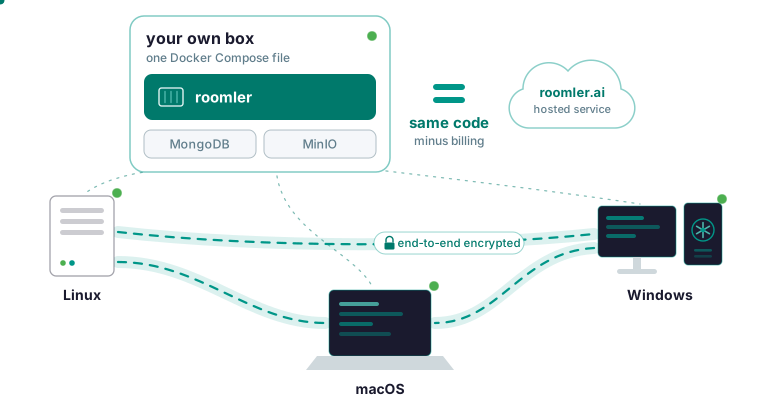
Roomler is a Headscale alternative whose self-hosted server is the same server that runs its hosted service, minus billing, brought up from one Docker Compose file. What you give up first is Tailscale’s clients: Roomler’s agent, roomlerd, runs on Windows, Linux and macOS, so a phone cannot join. There is no SSO or SCIM provisioning either. In exchange, the agent that puts a machine on the mesh also serves its screen to a browser tab.
Why people leave Headscale
Headscale is a community reimplementation of Tailscale’s coordination server, which Tailscale does not open-source. You keep Tailscale’s own clients, and that is where Headscale beats Roomler: Tailscale’s clients run a mesh with years of production use behind it, while Roomler is young. Headscale’s community is far larger, too.
The cost is on the server side: Headscale copies a product it does not control, so it trails that product.
Any self-hosted Tailscale alternative has to pass three tests:
- Its server is the product’s own code, with nothing held back.
- That server coordinates and never carries your traffic in plaintext.
- One agent covers the mesh and the screen tool you run beside it today.
Roomler: the hosted server image on your own box
The stack is one container with the API, the web app, the signaling plane, the chat and conferencing server and the relay floor, plus MongoDB and MinIO for state and file storage. No feature is held back, and nothing caps devices, users, remote sessions or meeting length. In the Tailscale comparison table, self-hosting the control plane reads “Yes, same code” for Roomler and “Community reimplementation” for Tailscale.
For the second test, the server hands each machine the peers it may reach and never carries your traffic in the clear; when no direct path exists, the fallback relay forwards ciphertext it cannot read. Calls are the one exception, covered below.
You need Docker with Compose v2, about 4 GB of RAM and 10 GB of disk. Images for linux/amd64 and linux/arm64 pull anonymously from GitHub’s container registry. The server is AGPL-3.0 and the agent MPL-2.0, and running it for yourself, your family or your company is what the license is for.
Bring it up with Docker Compose
Clone the repository and copy the example environment file:
git clone https://github.com/gjovanov/roomler-ai.git
cd roomler-ai
cp.env.selfhost.example.env.selfhost
Fill in the required values in .env.selfhost, then generate the four secrets:
openssl rand -hex 32   # ROOMLER_JWT_SECRET
openssl rand -hex 32   # ROOMLER_TURN_SECRET
openssl rand -hex 24   # MONGO_ROOT_PASSWORD
openssl rand -hex 24   # MINIO_ROOT_PASSWORD
Hex output keeps the datastore passwords alphanumeric, and they need to be: the MongoDB password is interpolated into a connection URL, where an @, :, /, ? or # breaks it, and the failure looks exactly like a wrong password. In production the server refuses to start on the built-in default token secret, and rotating that secret invalidates every existing session, which is the point after a leak. Keep .env.selfhost out of version control and readable only by the account that runs the stack.
Pull before you start anything:
docker compose -f docker-compose.selfhost.yml --env-file.env.selfhost pull
docker compose -f docker-compose.selfhost.yml --env-file.env.selfhost up -d
The service has a build: section, so Compose treats a missing image as buildable, and up -d on its own compiles Roomler from source without telling you. Follow the logs while it comes up:
docker compose -f docker-compose.selfhost.yml --env-file.env.selfhost logs -f roomlerUpgrading is pull then up -d again. Back up the MongoDB and MinIO volumes, which hold the state, and restore them once into a throwaway stack to prove the backup. After each upgrade, check that the health endpoint returns success, a device still shows online, a remote session still connects and a call still carries video, which the hardening guide calls the most fragile of the four.
Put it behind your own hostname
Roomler has no automatic TLS, by design: terminate it in nginx, Caddy, Traefik or whatever you already run, and point the proxy at the container’s HTTP port. Serve HTTPS for anything that is not a laptop talking to itself, because the session cookie is a full API credential.
Set the public origin in the environment to exactly what browsers use, port included, since sign-in returns, invite links and the CORS policy all key off it. http://127.0.0.1 and http://127.0.0.1:8080 are different origins, and a mismatch fails silently: the websocket upgrade is refused and the app’s realtime side stops working.
Only two things face the outside: the HTTP port behind your TLS terminator and the RTC UDP range for call participants. The database and object store stay internal, as the ports and firewall reference lays out. The relay floor rides that same HTTP port and already guarantees connectivity when no direct path exists, which settles the DERP question: no separate TURN server is on the critical path.
Calls are the one part a proxy cannot fix: browsers send media straight to the IP the server announces, so that IP must be reachable from browsers. On Linux, give the roomler service network_mode: host and drop its ports: block to open the full UDP range.
To verify, run these from a machine once the agent from the next section is on it:
curl -sI https://roomler.ai/health     # or your own server
roomler netcheck                       # what this machine can actually reach
roomler peers                          # which path each peer is on
On a restrictive network, netcheck is the one to read: it reports reachability, the relay verdict, floor health and NAT class as measured.
Enroll machines against your server
Your server serves its own installers, and the script it hands out names your origin, so a machine enrolled from your instance joins your instance. Mint a token in your dashboard under Devices, then Enroll device; each token is single-use, valid for about ten minutes and scoped to one organization. The headless Linux install, as the docs print it:
curl -fsSL https://roomler.ai/api/setup/install.sh | sh -s -- \
  --role daemon --system --token <token> --server https://roomler.ai --name "$(hostname)"
The command your own dashboard gives you carries your origin in both places. --server is the flag that points an install at a self-hosted server. A command copied from elsewhere may still name roomler.ai, and then the machine never shows up in your dashboard. Ask the machine:
roomler status # which server does it think it belongs to?If an earlier attempt already spent the token, mint a fresh one.
Agents need outbound TCP 443 to your server, outbound UDP to peers and relays, and nothing inbound, so no machine needs port forwarding. On a corporate allow-list, your hostname covers the control connection and the Windows installer, but the Linux and macOS packages and every automatic update come from GitHub’s release downloads.
Agents run on Windows, Linux and macOS; joining the mesh on a real network adapter takes a machine install on Windows, a system install on Linux, or the root half (--daemon-token) on a Mac, which then shows up as two devices. roomler status prints the control connection and the mesh state on one line, since an organization’s mesh can be switched off while its machines stay connected.
What the mesh gives a Headscale user
Each machine on the private network gets a stable private address, leased from its organization’s range. Organizations get separate blocks that never overlap. Each machine also gets a name (MagicDNS), and a rename in the dashboard updates it across the mesh without touching the machines.
An exit node takes two parties: the machine offers, and an administrator approves it in the dashboard. Before rerouting anything, the agent pins the paths that carry the mesh and the control connection, and if it cannot, it withholds the change. Windows Home cannot be an exit, and a Windows exit carries IPv4 only.
Subnet routers work the same way: a machine advertises a range, an admin approves it, and the rest of the mesh reaches the range through that machine. When you only want one network, prefer a subnet router, which adds a route, to an exit node, which changes the default route.
Network ACL rules name a source, a destination and the allowed ports and protocols, and can be written between tags. The modes are Off, Warn and Enforce; go through Warn first and read what it would have denied, because enforcing mode has not yet been widely exercised in the field.
SSH needs no sshd and binds no port, on Windows too, because the agent intercepts SSH traffic below the operating system’s socket layer. It is off by default behind four independent gates. Shells, scp, sftp, -L, -J and -D work; -R is deliberately not implemented, because it would make the machine bind a listening socket.
For CI and containers, reusable enrollment keys come with an expiry, revocation, a use limit and a record of every use. An ephemeral device removes itself on a clean stop, and restarting its agent produces a new device with a new address, by design. On your own instance, --server takes your origin:
roomlerd enroll --server https://roomler.ai --token <reusable-key> --ephemeral --name <name>Relays start with the TLS floor on your server, which is always available. One of your own machines can also relay, on UDP 3478 by default, the only inbound port any of your machines will need. A pair that falls back to a relay keeps trying for a direct path, permanently.
Day to day, you need two commands:
roomler status    # this machine: address, name, and how it is connected
roomler peers     # everything else on the mesh, and how each one is reached
Remote desktop from the same agent
If your screens come from RustDesk, VNC or RDP over the mesh today, Roomler puts that job in the agent: the machine you just reached by address is already a live screen in a browser tab, under the same identity and audit trail. One daemon is the mesh node, the remote-desktop target, the tunnel endpoint and the SSH server, so a desktop session, a port forward and a shell share one enrollment, one access model and one audit trail. Next to a mesh client, RustDesk is a second agent with its own control plane, identity system and audit trail, and it has no idea the mesh exists. RustDesk has the longer record: years of production use and an enormous install base.
When you open a screen, the server checks that you are allowed, introduces the two ends and steps out, and video, input, clipboard and files take the fastest path that works. If that path is a relay, the relay forwards ciphertext it cannot decrypt.
By default the machine asks the person at it, and an absent setting means ask; unattended access is right for your own servers and wrong for a colleague’s laptop. The viewer is a browser with nothing installed, and the docs recommend Chrome, Edge or another Chromium browser.
Chat rooms and video calls run on the same server and accounts. Calls are the exception what the server sees spells out, because their media passes through the server’s forwarding unit. Self-hosted, that server is your own box.
What you give up
- The agent runs on Windows, Linux and macOS only, so a phone cannot be a node.
- Processor support is narrower still: x64 only on Windows, x86_64 and arm64 on Linux, and Apple silicon only on macOS.
- There is no SSO or SCIM provisioning, which the NetBird comparison counts as a gap for an organization of any size. Sign-in is a password or OAuth with Google, GitHub, Microsoft, LinkedIn or Facebook.
- A node cannot publish a service to the public internet; Roomler’s tunnels only reach into your network from your own devices.
- Roomler has no Kubernetes operator.
- The compose stack runs a single API instance (multi-node is a Kubernetes topology), has no automatic TLS, and has not yet been run end to end on an arm64 host.
- User sessions are not individually revocable, and there is no password-change flow yet.
- Network ACLs are feature-complete, but enforcing mode has not been widely exercised in the field.
- Roomler is young, while Tailscale has years of production use across an enormous fleet.
- Support is the GitHub issue tracker, the same arrangement the comparison lists hold against Headscale.
Choosing between Headscale, NetBird and Roomler
- If you need phone or router clients, keep Headscale, which runs Tailscale’s clients, or move to hosted Tailscale.
- To publish a service from a node to the public internet, use hosted Tailscale, where that is a first-class feature.
- For SSO, SCIM provisioning, a Kubernetes operator or the most mature open-source mesh, choose NetBird. The NetBird comparison calls it the direct answer if you want an open-source Tailscale replacement with SSO.
- Choose Roomler for the network and the screen from one agent, with a control plane on your own box that runs the hosted service’s code.
If you are choosing a stack, count the agents you will be running in a year. Run the whole stack yourself with Docker Compose: the self-hosting guide has every step, and self-host hardening is the checklist to keep open beside it.