
NetBird alternatives for self-hosters, compared by use case
- netbird-alternative
- netbird
- alternatives
- self-hosting
- mesh
- remote-desktop
- open-source
- tailscale-alternative
Sort by job first, because these products do different jobs.
- You need SSO or SCIM provisioning, mobile clients or a Kubernetes operator: stay on NetBird.
- You want a hosted mesh with the widest client coverage and public ingress: Tailscale.
- You want Tailscale’s client apps on a coordination server you run: Headscale.
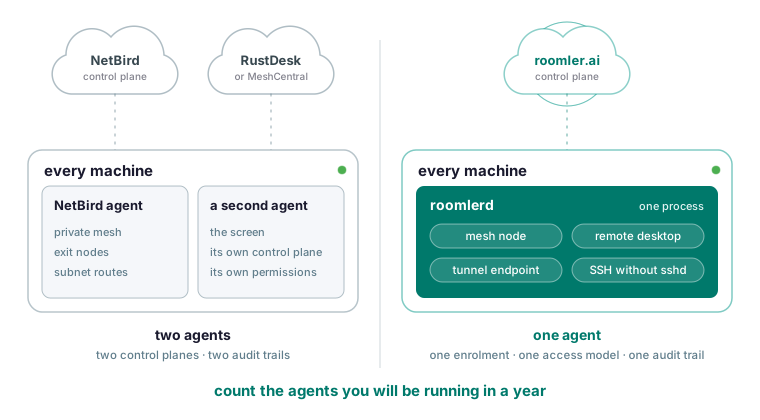
- You run NetBird plus a second product for screens and want one agent, one enrolment and one audit trail per machine: Roomler.
- A screen is all that is missing: keep NetBird and add RustDesk or MeshCentral, with a second agent on every machine.
The first line is Roomler’s own verdict: the SSO gap is “a real gap in Roomler, not a soft one”.
The directory pages (AlternativeTo, G2, OpenAlternative, SourceForge, LibHunt) rank by votes, so a peer-to-peer mesh, a hub-and-spoke WireGuard server and an identity vendor end up in one list with nothing to say which of them does your job. Roomler’s compare pages work from the other end: each opens with what the other product does better.
What NetBird does better than everything below
NetBird has shipped steadily for years, with a team behind it, a large user base and the operational record that follows. It has SSO and IdP integration, with groups and policy built around them, where Roomler has OAuth sign-in and no SSO or SCIM provisioning. Its clients cover more platforms, including mobile, and it ships a Kubernetes operator and container-friendly deployment patterns. Its interface, coordinator and clients are one supported stack with a well-worn install path, and it has more recipes, more integrations and more people who hit your problem first.
Where the two are level, the NetBird comparison says so: both have a private mesh, exit nodes and subnet routes, and both let you self-host the control plane. The same page says that if your requirement is an open-source Tailscale replacement with SSO, NetBird is the direct answer and you should evaluate it seriously. For the full feature list, read NetBird’s documentation.
A hosted mesh with the widest client coverage: Tailscale
Tailscale has years of production use across an enormous fleet, and its clients run on iOS, Android, Synology, QNAP, routers and embedded devices. Roomler’s agent runs on Windows, Linux and macOS, and its viewer is a Chromium-based browser. There is no mobile viewer, so an iPhone or iPad cannot be the controller. Publishing a service to the public internet from a node is a first-class Tailscale feature, and Roomler has no equivalent, because its tunnels reach into your network from your own devices. Tailscale also has SSO, SCIM provisioning, device posture and a large community with published recipes.
Coming from NetBird, you give up the open control plane. Tailscale’s coordination server is not open source. In the side-by-side table, the row for self-hosting the control plane reads “Community reimplementation” on Tailscale’s side. If that does not matter to you and your problem is purely a private network between your machines, Roomler’s docs call Tailscale an easy recommendation and say you should use it. Against Roomler specifically, Tailscale wins on mobile apps, public ingress and SSO.
Tailscale’s clients on a control plane you run: Headscale
With Headscale you keep Tailscale’s client apps and host the coordination server yourself. Roomler’s docs say exactly one thing about it: Headscale is a community reimplementation of Tailscale’s coordination server, and Tailscale itself runs different code. For OIDC sign-in, pre-auth keys, ACLs, subnet routes and exit nodes, read Headscale’s documentation, since nothing on Roomler’s side describes them. You get the widest client coverage of any self-hosted option in this article, and an agent with no remote desktop, so if you run a second product for screens today you keep running it.
The network and the remote screen from one agent: Roomler
NetBird gives you the network; seeing a screen is then a separate product with its own agent, control plane and permissions. Roomler’s daemon is at once the mesh node, the remote-desktop target, the tunnel endpoint and the SSH server, so a desktop session, a port forward and a shell share one enrolment, one access model and one audit trail. The agent is one process because the parts are not independent: the mesh’s path selection and the remote-desktop session want the same measurements about the same peers, and the SSH server sits inside the packet path the mesh owns.
On the private network, each enrolled machine gets a stable private address and a name. Both ends connect outbound, so no machine needs an inbound port, and with every UDP path blocked the mesh still runs over TLS on port 443, as ports and firewall spells out. The two commands you will use most:
roomler status    # this machine: address, name, and how it is connected
roomler peers     # everything else on the mesh, and how each one is reached
roomler peers prints every peer, its address and the path currently carrying it. If it says Relay for two machines on one office network, the usual cause is a VPN client that captured the local range, and cannot connect gives the test.
For remote desktop, the viewer is a current Chromium-based browser with nothing installed, and the target runs the agent plus whatever screen-capture permission the OS demands. Pixels and keystrokes travel on the same peer-to-peer channel, and the server never holds session video, keystrokes, tunnel contents or SSH bytes. When no direct path exists, a relay forwards ciphertext it cannot decrypt.
SSH gives you a shell on any enrolled machine with no sshd, no bound port and no firewall rule, Windows included, because packets to the machine’s mesh address on the SSH port are diverted into the agent below the socket layer.
ssh dev-boxIt is off by default and stays off until the organization enables it, the user holds the SSH permission, the device policy allows it and the machine’s own configuration lists an authorised key. In the NetBird table, the rows for remote desktop and for SSH without sshd both read No on NetBird’s side. Chat, rooms and video calls run on the same server and accounts.
What leaving NetBird for Roomler costs you
The side-by-side table gives NetBird four rows outright: SSO and SCIM, mobile clients and a Kubernetes operator all read No for Roomler, and maturity reads Young. Other pages add the gaps a NetBird user asks about next. There is no public ingress: tunnels reach into your network from your own devices. ssh -R remote forwarding is deliberately not implemented, because it would make the machine bind a listening socket. Network ACLs are feature-complete but not yet widely exercised in enforcing mode, so the documented path is Warn first, read what would have been denied, then Enforce. User sessions are not individually revocable, and there is no password-change flow yet. Session contents are not recorded for compliance, whether SSH or desktop; the FAQ says this is deliberate and calls it a gap if you need session recording.
The compare page’s last rule is for anyone choosing a stack instead of a product: count the agents you will be running in a year.
Self-hosting Roomler’s control plane with Docker Compose
Self-hosting runs one container with the API, the web app, the signalling plane, the chat and conferencing server and the relay floor, plus MongoDB and MinIO for state and files. You need Docker with Compose v2, about 4 GB of RAM and 10 GB of disk.
git clone https://github.com/gjovanov/roomler-ai.git
cd roomler-ai
cp.env.selfhost.example.env.selfhost
Fill in .env.selfhost and generate the secrets.
openssl rand -hex 32   # ROOMLER_JWT_SECRET
openssl rand -hex 32   # ROOMLER_TURN_SECRET
openssl rand -hex 24   # MONGO_ROOT_PASSWORD
openssl rand -hex 24   # MINIO_ROOT_PASSWORD
Hex output is alphanumeric, which matters: a @, :, /, ? or # in the database password breaks the connection URL it is interpolated into, and the failure looks exactly like a wrong password.
docker compose -f docker-compose.selfhost.yml --env-file.env.selfhost pull
docker compose -f docker-compose.selfhost.yml --env-file.env.selfhost up -d
Run pull first. Compose treats a service with a build: section as buildable, so up -d on its own compiles a missing image from source, and does it silently. Upgrading is the same pair of commands. Then follow the logs:
docker compose -f docker-compose.selfhost.yml --env-file.env.selfhost logs -f roomlerThere is no automatic TLS, deliberately: terminate it in nginx, Caddy, Traefik or a cloud load balancer, point the proxy at the container’s HTTP port, and set your public origin so sign-in, invitations and the CORS policy agree. The port is part of the origin, and a mismatch produces a refused websocket upgrade and an application whose realtime side silently does not work. Conference media is the one part a proxy cannot fix, because browsers send it straight at the announced address on a UDP port range; the two settings that decide it are on the calls troubleshooting page.
Your server serves its own installers, and the script it hands out names your origin, so a machine enrolled from your instance enrols against it. The headless Linux one-liner on the install page installs the agent as a root systemd service, and on your own instance its --server flag points at your hostname instead of roomler.ai.
If a machine never appears in your dashboard, roomler status shows which server it thinks it belongs to.
The server is AGPL-3.0 and the agent MPL-2.0, and running it for yourself, your family or your company is what the licence is for. The compose stack runs a single API node, and multi-node scale-out is a Kubernetes topology this file does not describe. arm64 images are published, but nobody has brought the whole stack up on an arm64 host yet. A separate TURN server is optional, because the built-in relay floor already guarantees connectivity when no direct path exists.
If you only lack a screen, keep NetBird and add one
RustDesk is a mature remote desktop with native clients, including iOS and Android, a large community and a narrow scope; if the one thing you need is to see and control a screen, it solves exactly that. MeshCentral is self-hosted and Apache-2.0 throughout, covers hardware inventory, power control, out-of-band management and software deployment, relays RDP, VNC and SSH to devices that will never run an agent, and runs on very little hardware. Each beats Roomler somewhere. RustDesk has a mobile viewer and Roomler has none. MeshCentral’s fleet-management surface is wider than Roomler’s, and its single Apache-2.0 licence is simpler than Roomler’s AGPL server if copyleft is a problem for you.
The cost of either pairing is two agents, two control planes, two identity systems and two audit trails on every machine, and the remote-desktop half has no idea the mesh exists. After a RustDesk session you still cannot reach the machine’s services, which is the gap the mesh was meant to close.
The rest of the directory lists, sorted by category
Roomler’s docs compare against none of these, so each gets one clause from its own homepage. ZeroTier is a peer-to-peer virtual network on its own protocol instead of WireGuard. Netmaker builds WireGuard virtual networks with a server and a netclient agent. Nebula is an overlay network with lighthouse hosts for discovery. wg-easy is a single WireGuard server with a web UI, so hub-and-spoke. Pangolin combines identity-aware reverse-proxy ingress with WireGuard tunnels. Firezone is WireGuard remote access with policy. OpenZiti is a zero-trust overlay with SDKs and tunnelers. OpenVPN Access Server is a hub-and-spoke VPN.
A directory that puts wg-easy, Okta and a Check Point firewall next to NetBird is listing categories. A mesh replaces a mesh, and a hub-and-spoke server replaces a hub-and-spoke server. The line between them is the one Roomler’s MeshCentral page draws: two enrolled machines talk to each other without the server in the path at all.
Try it with two machines
Create a workspace; the free plan covers three devices with the private network, remote desktop, tunnels, chat and calls included. Mint a token under Devices, Enroll device; it is single-use and short-lived, so paste it into a terminal and keep it out of chat rooms. Install the agent, watch the device come online, then open the screen; an attended machine shows a consent prompt by default. Join it to the private network and reach one machine from the other by name.
Put two of your machines on one private mesh in a few minutes with the quickstart.