
Exit node vs subnet router, and which one you need
- exit-nodes
- subnet-router
- routing
- mesh
- tailscale
- tailscale-alternative
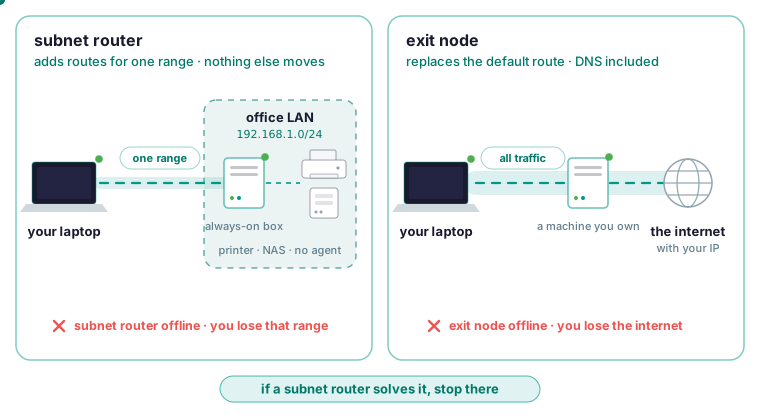
Turn on a subnet router when you need to reach specific devices on one network that cannot run an agent. Turn on an exit node only when all of a device’s internet traffic has to leave through a machine you own. The subnet router is the smaller change: it adds routes for one range on the client, and when it goes down you lose that range. The exit node replaces the client’s default route, and when it goes down the client loses the internet. If a subnet router solves your problem, stop there. The usual one-line definition (one routes everything, the other routes a range) is true and still leaves you guessing which toggle to turn on, because the difference that matters is what each one costs when it fails.
What each one changes on the client
A subnet router is one enrolled machine that advertises a whole network range, say 192.168.1.0/24, on behalf of the devices on it. The client gains extra routes for that one range, and nothing else about its routing moves. An exit node is one of your own machines that other devices send their entire internet traffic through, IPv4, IPv6 and DNS included. On the client, the default route itself changes. The first is typically used to reach the office LAN, the second to appear to be at the office. DNS follows the traffic on an exit node, so name resolution happens from the exit node’s vantage point and does not leak to your local resolver.
What breaks when each one goes down
Take the subnet router offline and the client loses that one network. Everything else carries on, because nothing else was routed through that machine. Take the exit node offline and the client loses internet access, because its default route points at a machine that has stopped answering.
The docs give the reason for preferring a subnet router when you can: redirecting a device’s entire default route is a much bigger change than adding a route to one range, and it fails in a much more visible way. That is the decision rule for everything below: pick the smallest routing change that solves the problem.
When a subnet router is the right tool
Some things on a network will never run an agent: a printer, a NAS, a switch’s management interface, a hypervisor, an industrial controller. A subnet router is one enrolled machine that advertises a range on their behalf, and the subnet routers page describes the setup in four steps.
- Pick a machine that is already on the network you want to reach and is normally on. A small always-on box is ideal.
- Configure it to advertise the range, for example the office LAN.
- An administrator approves the advertised range in the dashboard.
- Every other device on the mesh can now reach addresses in that range, routed through the advertising machine.
Steps 2 and 3 are separate on purpose. A machine advertising a range does not get to route it until an admin approves, because “I can reach 10.0.0.0/8, send me everything for it” is a large claim and takes two parties. If you have advertised a range and nothing routes, check for that approval first. Neither feature needs a port opened on your router, because both ends connect outbound and meet in the middle.
When an exit node is the right tool
An exit node is the right tool in three documented situations: you are travelling and want to appear at your home or office connection from anywhere, you want a fleet’s outbound traffic forced through one auditable point, or a service allow-lists a specific address and the machine you are on has no fixed one.
The exit nodes page also names three things it is not. Anonymity is the first, since traffic exits from a machine that is yours, with your IP. Per-application routing is the second: an exit node takes all of the device’s traffic or none of it. And it does not stand in for a subnet router, because when you only want one specific network, a subnet router reaches it without redirecting everything else.
In every case the client is a Windows, Linux or macOS machine running the agent. There is no mobile app, so a phone cannot be the client of either feature.
Turning on an exit node without losing the box
Setting one up takes an offer, an approval and a use. The exit machine offers itself by enabling exit-node mode in its configuration, through overlay_exit_node_enabled in the configuration reference. Offering is not enough on its own. An administrator then approves the device as an exit node in the dashboard; a device cannot promote itself. Finally the client names the exit node it wants by setting overlay_exit_node to that machine’s name. All of the client’s traffic then goes through the exit.
Change the configuration through the CLI, which writes atomically and keeps a previous copy. Most network settings apply live.
roomler config ls
roomler config set <key> <value>
roomler config clear <key>
Rerouting all traffic through another machine is one command away from removing your own access to the box you typed it on, so the implementation is built around a never self-wedge rule. The paths that carry the mesh itself and the control connection are pinned first, as explicit exemptions. If those exemptions cannot be installed, the change is withheld entirely rather than half-applied. A guard re-asserts the routes continuously, because other VPN clients are known to reap routes out from underneath. If routes keep vanishing while a corporate VPN client is connected, the cannot connect page names that client as the suspect and gives the test: disconnect it on one end and watch the pair converge to direct. On restart, a reconciler heals any leftover routing state from an unclean exit.
Even with those guards, understand what an exit node does to inbound traffic. It reroutes replies to inbound connections too, and that includes the SSH session you may be using to configure it. If you have not exempted that session, enabling an exit node can drop your own shell. Configure exit nodes from a console you cannot lose, or over the mesh itself, which is exempted. Do not run an exit-node experiment on a production box that you reach only over plain SSH.
To turn it off, clear the setting on the client; the split-default routes are withdrawn and normal routing returns. If a machine comes back from a hard shutdown with stale routing, the boot reconciler clears it, so nothing is left to you.
The overlapping-range trap
If two machines advertise the same range, traffic is routed through one of them and does not load-balance, so the second machine adds confusion and no resilience. Advertise a range from one machine unless you have a specific reason not to.
The other failure is overlap, and it strands people. Advertising a range that overlaps with the client’s own local network is the usual cause of “everything broke when I approved this”. A laptop on 192.168.1.0/24 that suddenly routes 192.168.1.0/24 over the mesh has lost its own router. That range is the default on many home routers, so an office LAN on the same range is a trap waiting for the first person who approves it from home. Pick unambiguous ranges, and advertise the narrowest one that covers what you need. Check which ranges your client machines already sit on before you approve anything. An exit node is this same class of change applied to every destination at once, which is why it fails so much more visibly.
Approving a route does not grant access
Approving a route makes addresses reachable. Whether a given device may reach them is a separate question, governed by the organization’s access rules. The separation is deliberate: routing and authorisation are different questions, and collapsing them is how a subnet router becomes an accidental bridge into a production network.
A network access control rule names a source (a device, a tag, a user or a group), a destination (a device, a tag or an address range), and the ports and protocols that may be reached, such as tcp:22 or udp:53. Rules are enforced at both ends, and that enforcement covers source and destination validity, so a peer cannot address something outside what it advertises.
Roll the policy out through Off, then Warn, then Enforce, and read the Warn log before you enforce. Network ACLs are feature-complete but have not yet been widely exercised in enforcing mode in the field, so Warn is the recommended path. If the policy cannot be read, the answer is no.
Checking that it works
From another device, confirm you have the route and ping something inside the range.
roomler status     # confirm you have the route
ping <an-address-in-the-range>
Status prints this machine’s id, version, mode and mesh address, its server connection, and the mesh state per organization. Read both halves of that line. A device can be connected to the control plane and still have no mesh, which is why both are printed together. The organization may have its mesh switched off, and on macOS the mesh needs the root half of the install.
If the route is present and traffic does not flow, the next suspect is the advertising machine’s own firewall, then the access rules. Under enforcing ACLs a peer you may not reach is not in your peer list at all, so a missing peer can be a policy outcome instead of an outage.
roomler peers # everything else on the mesh, and how each one is reachedIt names every peer, its address, and the path currently carrying it.
One machine in two organizations has one default route
One agent can hold several enrollments, which the multi-org page describes as the supported way to put a machine in more than one organization. Anything that is necessarily host-global follows the primary organization only, and exit-node routing is on that list because there is one default route. A secondary organization’s administrator cannot change host-global settings, by design, so a machine’s owner does not have their default route changed by a workspace they merely collaborate with. The exit-node role itself is primary-organization only. So an administrator in a secondary organization who sets an exit node sees nothing change on the machine; set it from the primary.
roomler status # connection AND mesh state, per organizationIt shows, per organization, whether the machine is connected and whether its mesh is on.
Which one you need
- You need to reach specific devices on one network that cannot run an agent: a subnet router.
- All of a device’s internet traffic must leave through a machine you own, for a known IP, egress control or travelling: an exit node.
- If a subnet router solves it, stop there.
Tailscale has both features as well. It also has more years of production use, more platforms and mobile apps, and the comparison page says that if your problem is purely a private network between your machines, Tailscale is an easy recommendation. Roomler’s difference is that the same agent is also the remote desktop and the SSH server. The machine you just routed to is already viewable in a browser tab, under the same identity, with the same audit trail. Put two of your machines on one private mesh in a few minutes with the quickstart.