
MeshCentral alternatives, sorted by the job you are replacing
- meshcentral
- remote-desktop
- self-hosting
- open-source
- mesh-network
- alternatives
- meshcentral-alternative
- teamviewer-alternative
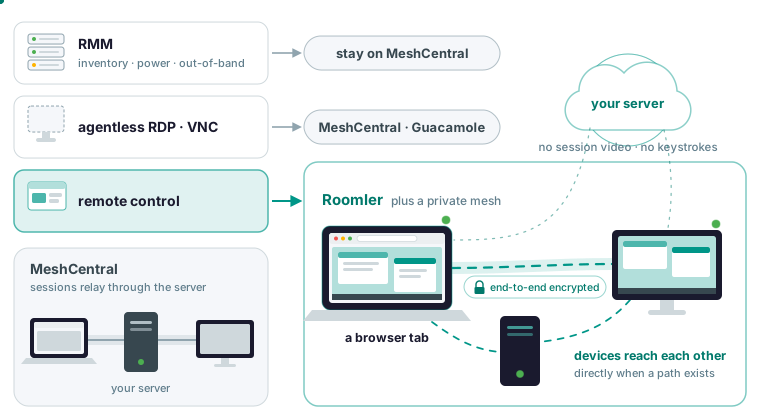
Which MeshCentral alternative fits depends on which of its three jobs you are replacing. If the job is RMM, or relaying RDP and VNC to devices that will never run an agent, stay on MeshCentral. Roomler’s own comparison page sends you there for both. If the job is remote control of your own fleet plus a private network between those machines, Roomler is an open-source, self-hosted option. Its sessions are peer-to-peer and end-to-end encrypted, and fall back to a relay that sees only ciphertext when no direct path exists.
Which MeshCentral job are you replacing
The directories that rank for this search put RustDesk, Apache Guacamole and Tactical RMM in one column, which hides that MeshCentral does three different jobs. It is an RMM: hardware inventory, power control, out-of-band management, software deployment and device groups. It relays RDP, VNC and SSH through its web interface to devices that will never run its agent. And it gives you browser-based control of the machines that do run its agent.
Each candidate replaces one of those. Tactical RMM bundles MeshCentral for remote access, so it extends the first job and replaces nothing. Apache Guacamole is a clientless RDP, VNC and SSH gateway: the second job, with no agent at all. RustDesk is the third job, and it gives you a screen only. Roomler is the third job plus a private mesh between the machines, so when the screen session ends the machine is still reachable by address and name, for SSH or a port forward, without a second agent. If a screen is all you need, Roomler vs RustDesk is the shorter read.
What MeshCentral does better
MeshCentral manages a fleet more broadly: hardware inventory, power control, out-of-band management, software deployment, a terminal, a file manager and device groups. Roomler’s fleet features are narrower. More than a decade of production use sits behind MeshCentral, with a large documentation corpus and a long tail of solved deployment problems. Its RDP, VNC and SSH relaying reaches devices that will never run an agent. The licence is Apache-2.0 throughout, with no split to reason about, where Roomler’s server is AGPL and its agent MPL. MeshCentral also runs on very little hardware, where Roomler’s stack would not.
Roomler has limits of its own in the same areas. It is not a full MDM: you can enroll, update, configure and audit devices, and you cannot push arbitrary software or manage OS policy. It does not record remote sessions for compliance, by design, because recording a terminal or a desktop means shipping whatever an operator typed off the machine. There is no mobile viewer. The remote-desktop viewer targets Chromium, and Firefox and Safari get the dashboard, chat and calls. And it is young. The compare page opens with a tip: if you already run MeshCentral and it works, this article is unlikely to move you, and that is a reasonable outcome.
Sessions that do not pass through your server
MeshCentral relays sessions through the server by design. Roomler’s sessions go direct when a path exists and otherwise through a relay that forwards ciphertext, which is a bandwidth-and-cost difference at fleet scale and a trust difference at any scale.
How devices connect describes the ladder a pair climbs: the same LAN, then a direct path across the internet, then a hole-punched path through NAT on both ends, then a relay that only ever sees ciphertext, and as the floor, TLS on port 443 where every UDP path is blocked. The choice comes from measuring what works, and a pair that fell back to a relay keeps re-attempting a direct path. When a better path appears, the new one is established before the old one is torn down, so the upgrade does not interrupt a live session.
What the server sees is a short list: accounts and organizations, device rows with names and addresses, permissions and policies, audit records, chat messages and uploaded files, and presence metadata. It holds no session video, no keystrokes, no tunnel contents, no SSH bytes and no mesh traffic.
You can check this yourself. The session window shows a LAN, Direct or Relay indicator. From a terminal, roomler peers lists every peer with the path currently carrying it:
roomler peersWhen one pair is relayed and you want to know why, roomler why prints that peer’s ladder, each tier’s eligibility, and any hold-down overriding the ranking:
roomler why <peer>Two machines on the same office LAN showing Relay usually means a VPN client on one end has captured the local network range. Disconnect it on one end and watch whether the pair converges to direct, a test that takes a minute.
One feature is the exception: video calls use a selective forwarding unit, so each participant sends their stream to the server, which forwards it to the others. On your own server the distinction collapses anyway, because what the server sees becomes what your own machine sees, with nothing held back from a self-hosted deployment.
A session path tuned for interactive work
The compare page’s third difference is the remote-desktop path itself: hardware encoding chosen by a probe-and-rollback cascade, adaptive rate control, and a browser decode path that bypasses the roughly 80 ms of buffering a normal video element enforces. At startup the agent encodes a real frame with each candidate encoder and advertises only what worked, because a codec reported from a spec sheet is how you get a session that negotiates a format and then produces nothing. A codec is offered only when both ends can handle it. The low-latency decode path is a Chromium capability, which is why the viewer targets Chromium while the rest of the product is browser agnostic. In a session you steer the trade with a priority control: Responsiveness, Balanced or Clarity. Encoding is software only on macOS today, since VideoToolbox is not wired up and Apple Silicon encodes in software.
Devices that reach each other, with no server in the path
MeshCentral relays a session to a device. Roomler puts the device on a mesh, with a stable private address, a name, direct peer-to-peer paths between the devices themselves, port forwards, SOCKS5, exit nodes and SSH with no sshd. Two enrolled machines talk to each other without the server in the path at all, which a hub-and-spoke model does not do. Everything below happens after the screen session ends, which is the part a MeshCentral session never gave you.
Once two machines are on the mesh, the quickstart’s two commands show the shape of it:
roomler status          # this machine: address, name, carrier
roomler peers           # everything else on the mesh, and how it is reached
The first prints this machine’s address, name and carrier, and the second lists every other machine and how it is reached.
A port forward is one command:
roomler forward --agent <agent-id> --local 5432 --remote localhost:5432Afterwards localhost:5432 works with any client you already have, and nothing needs to know about the tunnel. The --agent flag takes the hex device id from the device’s page in the dashboard, and a display name passed there fails in a way that looks like the device is missing.
SSH needs no sshd on the far end: the agent intercepts SSH traffic below the operating system’s socket layer, so it binds no port, needs no firewall rule, and serves Windows the same way it serves everything else. From the CLI, the target can be a device name, a display name or the hex id:
roomler ssh <device>Interactive shells, one-shot commands, scp and sftp, and -L, -J and -D forwards all work. Remote forwarding with -R is deliberately not implemented, because it would make the machine bind a listening socket. The SSH port defaults to 2222, so an existing sshd on 22 keeps serving during a migration.
Reaching devices that will never run an agent
MeshCentral’s answer here is RDP, VNC and SSH relaying in the browser, and Roomler’s side-by-side table says No to that row. Roomler reaches an agentless device through an enrolled machine on the same network. At the end you point a client you already have at the address, so for a Windows box behind a subnet router that means your own RDP client where MeshCentral would have given you a browser tab.
A subnet router is one enrolled, always-on machine on that LAN that advertises the range. An administrator approves the range in the dashboard, and then every mesh device can reach the printers, NAS boxes, hypervisors and appliances in it. Advertising and approving are separate steps on purpose. Approving a route makes it reachable, and the organization’s access rules still decide who may use it. Advertising a range that overlaps the client’s own LAN is the usual cause of “everything broke when I approved this”, since a laptop on 192.168.1.0/24 that suddenly routes 192.168.1.0/24 over the mesh has lost its own router. Check it from another device:
roomler status     # confirm you have the route
ping <an-address-in-the-range>
A port forward whose --remote names another host makes the enrolled machine a jump host to something behind it, such as a database behind the office firewall:
roomler forward --agent <id> --local 5432 --remote <internal-host>:5432 --daemonThe --daemon flag hands the flow to the local agent so it outlives the command. For browsing a whole internal network, a SOCKS5 proxy reaches many destinations through one listener:
roomler socks5 --agent <agent-id> --local 1080
curl --socks5-hostname localhost:1080 http://<internal-host>/
The hostname form of the curl flag resolves the name at the far end, where the internal name exists. If you need browser-based RDP or VNC to agentless devices, MeshCentral or Guacamole is the right tool.
The fleet operations Roomler does have
You are leaving an RMM-shaped tool, so this is the exact list, and what switching each one on takes.
Enrollment tokens are minted in the dashboard under Devices, then Enroll device. Each is single-use, and once it is consumed you mint a fresh one. Re-running an installer on an enrolled machine reuses its existing device row, so a repair leaves no ghost devices.
Unattended access starts with consent mode Automatic, set per device, which skips the prompt. Being reachable with nobody logged in depends on the operating system: on Windows the Machine system service mode reaches the lock screen and the pre-logon desktop, and a machine installed in another mode needs the installer re-run with -Role daemon-system. On Linux a desktop wants the per-user unit and a headless box wants virtual-display mode, and a Mac must be logged in, though it may be locked.
Remote command execution runs from the dashboard or the CLI over the agent’s control connection instead of the mesh, so it still works when the mesh is the broken thing. Commands inherit the agent’s identity, SYSTEM on Windows and root under systemd, so grant it to the people you would give root to. The CLI form takes the same device selector as SSH:
roomler exec <device> -- <command> # <device>: device name, display name or hex idCommands and SSH are both off behind four independent gates, each owned by a different party: the organization’s switch per capability, a user permission, the device policy, and the machine’s own configuration, which the server structurally cannot write. Neither permission is in the default administrator role, and they are separate grants. Turning either on means touching the machine, unless the machine has itself opted in to remote configuration, and that opt-in is not remotely settable either.
Audit records cover every remote session, every command attempt including refusals, and every SSH decision with its reason, retained for 90 days. They can be exported for longer retention or for a SIEM.
The agent updates itself through your server’s origin, verifies the publisher signature, checks that the version inside the artifact matches what the manifest claimed, and rolls back a build that crash-loops. Admins can push a specific version to one device or the whole fleet from the dashboard. Network ACLs name a source, a destination and ports, with tags doing the work at any scale. Roll them out through Warn mode and read the log before enforcing, because enforcing mode has not yet been widely exercised in the field. All of that is narrower than MeshCentral’s fleet surface, which the compare page says before anything else.
Self-hosting it next to MeshCentral
MeshCentral lives on hardware where Roomler’s stack would not. Self-hosting wants Docker with Compose v2, about 4 GB of RAM and 10 GB of disk, and runs one container with the API, the web app, the signalling plane, the chat and conferencing server and the relay floor, plus MongoDB and MinIO.
The compose quickstart, as the page prints it:
git clone https://github.com/gjovanov/roomler-ai.git
cd roomler-ai
cp.env.selfhost.example.env.selfhost
Fill in the env file, generating the four secrets:
openssl rand -hex 32   # ROOMLER_JWT_SECRET
openssl rand -hex 32   # ROOMLER_TURN_SECRET
openssl rand -hex 24   # MONGO_ROOT_PASSWORD
openssl rand -hex 24   # MINIO_ROOT_PASSWORD
Keep the MongoDB password alphanumeric: it is interpolated into a connection URL, and a @, :, /, ? or # inside it fails in a way that looks exactly like a wrong password. Then pull before you bring it up, and follow the logs:
docker compose -f docker-compose.selfhost.yml --env-file.env.selfhost pull
docker compose -f docker-compose.selfhost.yml --env-file.env.selfhost up -d
docker compose -f docker-compose.selfhost.yml --env-file.env.selfhost logs -f roomler
The order matters: a service with a build section is compiled from source when its image is missing, silently, so up without the pull costs you the build the published image exists to save. On arm64 there is no published image, so a Raspberry Pi adds --build deliberately.
There is no automatic TLS, on purpose: terminate it in nginx, Caddy, Traefik or a load balancer, point the proxy at the container’s HTTP port, and set the public origin so sign-in, invite links and CORS agree about who you are. The compose stack runs a single node, and a separate TURN server is optional because the built-in relay floor already guarantees connectivity when no direct path exists. The firewall answer is short: an agent needs outbound TCP 443 to your server and outbound UDP to peers and relays, and nothing inbound on any machine.
The server is AGPL-3.0 and the agent MPL-2.0, and running it for yourself, your family or your company is what the licence is for. If any copyleft is a procurement problem, MeshCentral’s Apache-2.0 is simpler.
A self-hosted instance serves its own installers, and the script it hands out names your origin, so a machine enrolled from it enrolls against it. Enrollment starts in your own dashboard. The one-line installer on the Linux install page has a root system-service form for headless servers, and its --server flag points the agent at a self-hosted server instead of the hosted one.
Windows and macOS have their own pages, with service modes and the permissions each OS demands.
Choosing
The compare page’s table, trimmed to the rows that decide it:
| Capability | Roomler | MeshCentral |
|---|---|---|
| Self-hosted | Yes | Yes |
| Browser-based control | Yes | Yes |
| Session path | Peer-to-peer | Relayed through the server |
| Private mesh between devices | Yes | No |
| RDP, VNC and SSH relaying to third-party devices | No | Yes |
| Hardware inventory, power control, OOB | No | Yes |
| Chat and video | Included | No |
| Licence | AGPL server, MPL agent | Apache-2.0 |
| Maturity | Young | Very mature |
The five decision rules on the compare page follow from those rows:
- You want an RMM, with inventory, power control and out-of-band management: MeshCentral.
- You must reach devices that will never run an agent, over RDP or VNC relaying: MeshCentral.
- You want the devices to reach each other as well as being reachable from a console: Roomler.
- Server bandwidth, or a server-in-the-path trust concern, matters to you: Roomler.
- Any copyleft is a procurement problem: MeshCentral.
Chat, rooms and video calls run on the same server and accounts. Call media is the one feature that passes through the server, because a multi-party call needs a forwarding unit.
The free plan covers three devices, with the private network, remote desktop, tunnels, chat and calls included, so a trial needs no card. Once the machine shows online, click it and then View screen. Install Roomler on one machine and open its desktop from a browser tab: the quickstart.