
SSH into a machine behind NAT without port forwarding or sshd
- ssh
- nat
- port-forwarding
- mesh
- windows
- access-control
- tailscale-alternative
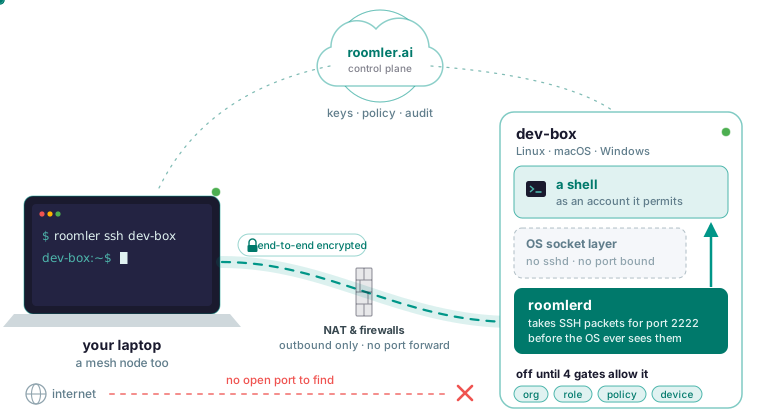
You can SSH into a machine behind NAT without forwarding a port on your router, because both machines connect outbound and meet in the middle. With Roomler you reach the target by its name on the mesh. The target runs no sshd and binds no port, Windows included. SSH stays off until four separate gates allow it.
Why the usual answers still need sshd
The top search results for SSH without port forwarding give the same four answers: forward port 22 on the router, keep a reverse SSH tunnel to a VPS alive with autossh, put the machine behind Cloudflare Tunnel, or join a mesh VPN such as Tailscale or ZeroTier. Each walkthrough assumes an SSH server is installed, running and listening on the target.
Forwarding a router port can’t work behind CGNAT, and where it does work it puts port 22 on the internet. The reverse tunnel moves the exposure to the VPS, which now listens on a public port. Its advantage over the agent-based options, Roomler included, is that it needs only OpenSSH and a VPS: no agent, and no account anywhere.
Tailscale comes closest to doing without sshd, because Tailscale SSH does that job on Unix. It is also more mature than Roomler, with mobile apps, public ingress and SSO. Roomler has none of those three. On a Windows target, though, all four answers start with installing and configuring an SSH server. The documented difference is that Roomler’s SSH serves Windows targets too.
How Roomler serves SSH with nothing listening
The agent intercepts packets addressed to the machine’s own mesh address on the SSH port, below the operating system’s socket layer, before the OS ever sees them, and it handles Windows the same way. The SSH server is part of roomlerd, the same agent that is the mesh node, which puts it inside the packet path the mesh owns.
Because nothing is bound, the agent never competes with an existing sshd for a port, and there is no separate sshd process. With nothing listening at all, SSH can’t be reached off the mesh, and there is no port for a firewall rule to close.
Each agent needs only outbound TCP 443 and outbound UDP, and nothing inbound, including for SSH. The pair takes the best path that works: the same LAN, a direct connection, a hole-punched one, or a relay that only ever sees ciphertext. When UDP is blocked, the floor is TLS on port 443. SSH payloads are encrypted end to end. The server holds no SSH bytes, including the commands you type and their output.
Put both machines on the mesh
First, install the agent with the quickstart on both ends: the machine you want a shell on, and the one you type on. Both must be on the mesh, because the SSH client is itself a mesh node.
On Windows and Linux the mesh comes up with the agent. On macOS it lives in the root half of the install, a second enrollment with its own token passed as --daemon-token, and a Mac without that half is absent from roomler peers entirely. Plain roomler commands on a Mac talk to the user half, and sudo roomler talks to the root half. An organization can also have the mesh switched off while its devices still look connected, and roomler peers then names that organization.
Each machine gets a private address that stays the same when it changes networks. It also gets a name, taken from the device name you chose at enrollment, and the name is what you should type.
roomler status    # this machine: address, name, and how it is connected
roomler peers     # everything else on the mesh, and how each one is reached
roomler peers lists every peer by name, with its address and the path currently carrying it.
Turn SSH on: four gates, all default-deny
SSH is off by default and stays off until four independent parties agree, and a refusal from any one of them is enough.
- The organization turns on remote SSH, a switch separate from the one for remote command execution.
- You hold the “SSH to a device” permission, which is deliberately left out of the default administrator role. Custom roles don’t pick up permissions added in later releases. To enable SSH keys, you need the SSH permission yourself.
- An administrator sets the device’s SSH policy: whether the machine accepts SSH at all, as which account, and whether it prompts.
- The machine’s own
config.tomlallows SSH, and the server structurally cannot write that file.
The server enforces the first three, so a compromised control plane would open them all at once. Gate 4 is the only refusal that survives a compromised server, and the price is having to touch the machine to turn SSH on. The exception is a machine that has set remote_config_enabled locally, so the dashboard may change its settings; no server can set that flag for it.
The configuration reference lists the SSH keys and their defaults.
| Key | Default | Meaning |
|---|---|---|
ssh_enabled |
off | Run the SSH server |
ssh_authorized_keys |
empty | Empty means nobody |
ssh_account_mode |
unset | Which account a key-list session runs as; unset means authenticate, then run nothing |
forward_acl |
empty | SSH port-forward destinations; empty means nowhere |
ssh_port |
2222 |
Not 22, so an existing sshd keeps serving during a migration |
Prefer the CLI to editing the file by hand, because it writes atomically and keeps a previous copy.
roomler config ls
roomler config set <key> <value>
roomler config clear <key>
On a Linux system service and on the macOS root half, the file is /etc/roomler/config.toml. It holds the agent token and, once SSH is on, the SSH host private key, so never copy it to another machine or paste it anywhere.
SSH settings take effect when the agent restarts, because the SSH server splices into the packet path when the mesh is built. The agent never restarts itself, so restart it or reboot the machine. The device list shows which capabilities each machine has switched on, so check it now and then for SSH left on after a debugging session.
Connect by name
Once the gates are open and the agent has restarted, roomler ssh opens an interactive shell on the machine by its name, in a terminal that handles resizing, on Linux, macOS and Windows. It resolves the account by policy and verifies the host key for you.
roomler ssh dev-boxOn Windows, prefer roomler ssh over roomler exec for a command whose arguments need quoting.
Plain OpenSSH, scp and sftp
To use stock ssh, scp and sftp, let OpenSSH reach the mesh through roomler proxy, which handles only transport and name resolution. It cannot supply an identity, so this path needs a key you manage yourself, listed in the machine’s ssh_authorized_keys. Roomler’s SSH answers on port 2222 by default, not 22, so an existing sshd keeps serving. Put the port in the same block.
# ~/.ssh/config
Host *.roomler
  ProxyCommand roomler proxy %h %p
  Port 2222
With that in place, a device is reached as its name plus .roomler.
ssh dev-box.roomler
ssh dev-box.roomler uptime
scp report.pdf dev-box.roomler:/tmp/
Add a command after the name to run just that one. scp and sftp work against a machine that runs no sshd. Renaming a device in the dashboard updates its name across the mesh. Removing a machine and enrolling it again gives it a fresh address, so scripts and SSH configs should use names.
Which account you land in
A session runs as exactly what was asked for and never more, and the device decides which accounts are permitted. If the account is unset, the session authenticates and then runs nothing. That explains a login that succeeds and then does nothing, and it means a missing setting never hands anyone a root shell. A value the agent can’t parse is refused, with no fallback.
Remote command execution inherits the agent’s identity, which is SYSTEM on Windows and root under systemd. An SSH session runs only as an account the device permits. File transfers run as the session’s own account. On a Windows target, SFTP works when the session runs as the daemon’s own account, and running it as the logged-in console user isn’t supported yet. The server’s record of each SSH decision includes the account mode.
Forwards: -L, -J and -D behind an allow-list that starts empty
Roomler’s SSH supports -L local forwards, -J jump hosts and -D dynamic SOCKS. The machine’s forward_acl lists where forwards may go, and the default empty list means nowhere.
Roomler’s tunnels read an empty list the opposite way. A tunnel flow was already authorised by the server before it reached the machine, so an empty local list there sensibly means no extra restriction. An SSH direct-tcpip channel has no server in its path at all, so an empty list has to mean nothing is permitted. Otherwise every SSH session would be a silent open pivot into whatever that machine can reach.
A refusal tells your client whether it was policy or an unreachable destination, and the reason text stays in the machine’s log because it names internal topology. For -J, the jump host authorises the hop, so a refused -J gets fixed in the jump host’s allow-list.
If you need one port and no shell, roomler forward opens it under the organization’s tunnel policy. Its --agent flag takes the hex device id from the dashboard, and a name is not resolved there.
roomler forward --agent <agent-id> --local 5432 --remote localhost:5432Why there is no -R
-R would make the machine bind a listening socket, the one thing this design exists to avoid, so Roomler deliberately does not implement it. It would also be redundant, because your client is itself a mesh node that the far end can reach directly.
In the VPS reverse-tunnel recipe, -R is there to manufacture an inbound path to a machine that has none. On the mesh that path already exists, in both directions. If what you want is a service on the public internet, Roomler has no public ingress, and Tailscale does.
Consent and what gets recorded
Depending on the device’s policy, a session may prompt the person at the machine. The prompt fires when the session is redeemed, so a refusal explains itself in your terminal, and if you have to wait, you are told so.
Two records are kept, deliberately apart. The server’s decision record is authoritative: who asked, for what, and whether it was granted or refused, with the reason. The machine’s activity report of sessions, commands and forwards is only the machine’s claim. That report is off by default (ssh_activity_log), so an empty activity log is no evidence that nobody connected.
Session contents are never recorded: no keystroke stream and no command output, because recording a terminal would ship things like sudo passwords off the machine. Audit records are kept for 90 days and can be exported. “View SSH audit” is in the default administrator role, while SSH itself is not.
When it refuses or will not connect
Start by running roomler peers on the machine you type on and finding the target and its path.
roomler peersIf the target is missing, first check that the device is online. A Mac appears only if its root half is installed. If the organization has the mesh switched off, the list names it. And with network ACLs in Enforce mode, any peer you are not allowed to reach is left out of the list entirely.
If the target is listed and SSH is refused, read the message: a permission problem comes back as a refusal. The organization’s SSH switch is separate from the one for remote commands, so a working roomler exec tells you nothing about SSH. On the machine itself, an empty ssh_authorized_keys refuses every login.
If the target is listed but the shell feels slow, check whether the pair is relayed. The most common cause is a VPN client on one end that captures the range the mesh uses, so disconnect it on one end and watch the pair converge to direct. roomler why <peer> shows why a peer is on its current path, and roomler netcheck shows what this machine can reach.
roomler why <peer>
roomler netcheck
When none of that helps, gather both ends with the paired diagnostic. Never paste config.toml into the report, because it holds the agent token and the SSH host private key.
roomler diag pair <other-device>Put two of your machines on one private mesh in a few minutes with the quickstart.