
What NAT traversal is, and how two machines pick a path through NAT
- nat-traversal
- nat
- hole-punching
- relay
- private-network
- connectivity
- tailscale-alternative
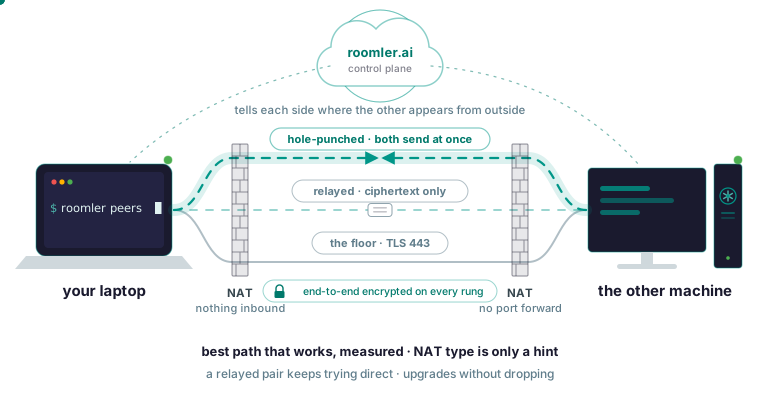
NAT traversal is how two machines that each sit behind a router reach each other without a port-forward rule. Both ends send a packet outward at the same moment, so each router treats the other side’s packet as a reply to something it already let out, and a direct path opens. When that cannot work, the traffic goes through a relay instead. Glossaries stop there. They do not say how a shipping system orders its paths, whether it decides from a guess about your NAT type or from measurement, or what it does after a pair falls back, and those are the parts you need when a status screen says “relay” for two machines you expected to be direct.
What NAT does, and why two machines behind it cannot simply call each other
Your router has one public address and many devices behind it. When a laptop sends a packet out, the router rewrites the source address and port to its own, remembers the mapping, and uses it to hand the reply back to the laptop. A packet that arrives with no matching mapping is dropped, because the router has no idea which device it was meant for.
So two home machines can both browse the web and still fail to reach each other: each can send, and neither can accept the other’s first packet. A port-forward rule is the manual fix, telling the router that anything arriving on a given port belongs to a given machine. You cannot add that rule on a network you do not administer, and you cannot add it at all behind carrier-grade NAT, where the ISP puts your whole router behind a second NAT that only it controls.
A Roomler agent needs outbound TCP 443 to the server and outbound UDP to peers, and nothing inbound. Both ends connect outbound and meet in the middle, so no router rule is required on any machine.
What NAT traversal means
NAT traversal is the set of techniques for getting a connection through NAT without a manual rule, and hole punching is the core of it. A coordinator that both machines can already reach tells each side where the other appears from the outside. Both then send to each other at once. Each router sees an outbound packet and creates a mapping, and a moment later accepts the other side’s packet as the reply it was expecting.
Glossaries attach three protocol names to this: STUN, which lets a machine learn how its own address and port look from outside; TURN, a relay for when punching fails; and ICE, which gathers candidate addresses, tries them and settles on the best one that works. NAT is the rewriting and the dropping; traversal is getting a connection through it anyway. In IPsec VPN material the same words usually mean NAT-T, which wraps IPsec in UDP so it survives the rewriting, a different problem with the same name.
In Roomler the coordinator is the server: it passes each side what it needs to find the other, then steps out of the way. It hands each machine its list of peers and never carries your traffic in the clear. The hole-punched rung of its ladder is exactly this case, both ends behind NAT coordinating to open a path at the same moment, and the docs call it the common case, one that works far more often than people expect.
The ladder a real system climbs
Roomler tries five paths in a fixed order of preference and takes the best one that works.
- Same LAN: both machines are on the same local network and use it, the lowest latency available.
- Direct across the internet: one or both ends is reachable at a public address.
- Hole-punched: both are behind NAT and coordinate to open a path through it simultaneously.
- Relayed: no direct path exists, so traffic is forwarded through a relay that only ever sees ciphertext.
- The floor: every UDP path is blocked, and the mesh still runs over TLS on port 443, the port that survives essentially every corporate network because blocking it blocks the web.
The list is the preference; the choice is a measurement of which rungs work right now, ranked against it. The ports and firewall page reduces the firewall side of this to three rows.
| Your network allows | What you get |
|---|---|
| Outbound 443 only | Everything works, on relayed paths instead of direct ones |
| Outbound UDP as well | Direct paths become possible |
| Outbound 443 blocked | Nothing works; this is the minimum |
A restrictive network lowers the quality of a path without taking the path away.
Why a NAT-type classifier is only a hint
Textbook material says to classify your NAT as full cone, restricted, port restricted or symmetric, then decide from the class. In Roomler both ends measure what actually works, and the decision is made from those measurements. The connection cascade page calls a NAT-type classifier “a useful hint and a terrible verdict”, because networks lie: middleboxes rewrite, VPN clients capture ranges, and “this looks like symmetric NAT” is wrong often enough that acting on it strands pairs that would have connected.
To see one machine’s measured view:
roomler netcheckIt reports reachability, the relay verdict, floor health and NAT class as measured on that machine, with nothing assumed from the firewall’s configuration. Read the NAT class as information about the network you are on, because the path decision does not come from it.
Seeing which path a pair is on
Run this on either machine:
roomler peersIt lists every peer the local agent sees, with the path currently carrying it. The remote-desktop session window shows the same thing as a LAN / Direct / Relay indicator. LAN means the two machines share a local network and you should expect a few milliseconds; Direct means straight across the internet at whatever latency the network has; Relay means no direct path was found, with higher latency and capped bandwidth.
When a pair is relayed, the next command says why:
roomler why <peer>It explains why that one peer rides the path it does: the ladder, each tier’s eligibility and any hold-down overriding the ranking. In the CLI reference’s framing, peers tells you a pair is relayed, and why tells you which tier was eligible, what it scored and whether something is holding the decision down.
Two other readings send you elsewhere. LAN or Direct with a slow session means the path is fine, so look at the encoder side instead: the far end’s CPU, the priority control, the far end’s resolution and forced hardware encoding. No entry at all means the peer is not reachable, so start with the device-offline checks; and under enforcing access rules, a peer you may not reach is left out of your list on purpose.
When hole punching fails: the relay and the floor
A relay works, but it is slower and bandwidth-capped, because someone else’s machine is forwarding your packets. For remote desktop the docs say the same two machines on a direct path are typically an order of magnitude better than on a relay. Every rung is encrypted end to end, and a relay forwards bytes it cannot decrypt, so adding one to the path changes performance and leaves privacy where it was.
Relays come in three kinds, in increasing order of preference: the TLS floor on the server, always available and the guarantee; a standard relay over UDP, Roomler’s or your own, which beats the floor; and an organization relay on a machine you own, so relayed traffic stops crossing Roomler’s infrastructure at all. An organization relay engages on a path change, so switching it on does not move an already-healthy pair onto it; to test one, restart one of the two machines to provoke the decision.
A machine acting as a relay listens on UDP 3478 by default, the port the symmetric-NAT corporate population was measured to reach; higher-numbered alternatives were not, so moving it to a random high port is not expected to work as well. That is the only inbound port anywhere, and only on a machine where you deliberately enable relaying. Relaying is gated four ways: an organization mode that is off by default, an access rule making the relay visible to each party, a per-device approval requiring two permissions, and the machine’s own opt-in. That opt-in is relay_server_enabled in the machine’s own config file, and the server cannot push it.
A relayed pair keeps trying direct, and upgrades without dropping
Two properties of the fallback are missing from most glossaries. A pair that fell back to a relay keeps re-attempting a direct path, permanently, and there is no state in which the software has given up. Upgrades are make-before-break: when a better path becomes available, the new one is established before the old one is torn down, so an upgrade does not interrupt a live session, and losing a direct path falls back instead of dropping.
Path changes are not always symmetric. One end can converge to a new path before the other, so one machine seeing a peer that does not yet see it back is a real state, and it resolves, sometimes more slowly than you would expect. A Relay reading right after a network change is therefore normal: the session page describes Relay as a stage the pair passes through while it keeps trying to upgrade in the background, and the reading to investigate is the one that stays.
When a pair stays relayed
The cannot connect page lists the causes in the order they occur in the field. Confirm the Relay reading with roomler peers on either machine, then work down.
- A VPN client on one end: corporate VPN clients frequently capture the local network range, including the ranges private meshes use, and reroute or drop that traffic, so two machines on the same physical network sit on a relay for days while every surface reports normally. Disconnect the VPN on one end and watch the pair converge to direct; the docs say that confirms it in under a minute. Some enterprise clients also reap routes belonging to other software; route guards re-assert continuously, but a client that fights hard enough keeps the pair relayed while it is connected.
- Symmetric NAT on both ends: a NAT that assigns a different external port per destination defeats hole punching, so a relay is the correct outcome, and it is common on some mobile networks and a few corporate firewalls. Confirm it with
roomler netcheckon each end, then accept the relay or run an organization relay on hardware you own. - UDP blocked outbound: the network permits only TCP 443, so the mesh sits on the floor, and the symptom is a machine that works everywhere except one office. Ask whoever runs that network for outbound UDP; the ports page says that if you can allow one thing, allow outbound UDP, because it is the difference between relayed and direct, and nothing inbound is ever needed.
- One end just moved: roaming between networks means a period of re-convergence, and it should resolve on its own within a minute or so.
Connectivity is a property of the pair, and one side’s output is half the picture, so if none of the four fits, gather both ends at once:
roomler diag pair <other-device>That runs a paired diagnostic and reports what each end sees. It differs from roomler diagnose: diag runs a canned, OS-appropriate evidence set on the target devices, which is what a why-is-this-pair-relayed question needs, while diagnose probes MTU, candidates and relay status from the machine you are sitting at, and its --agent flag takes the hex device id.
How this compares with Tailscale
Tailscale’s traversal is in the same family: punch a hole first, relay when that fails. Tailscale is the more mature mesh, with more platforms, public ingress, identity integrations and a larger community, and if a private network is the whole of your need the comparison page recommends it. Roomler’s difference is that the same agent is also a remote desktop and an SSH server, on a control plane whose code is open source.
Try it with two of your machines
Enroll two machines through the quickstart and join them to the private network; each gets a stable address and a name the other can reach directly, with no port forwarding and no public exposure. Then, on either one:
roomler status
roomler peers
The first shows this machine and how it is connected; the second shows everything else on the mesh and how each one is reached, so find the other machine and read the path next to it.
Put two of your machines on one private mesh in a few minutes: start with the quickstart.