
How to read a remote desktop audit log, refusals first
- remote-desktop
- audit
- security
- compliance
- consent
- access-control
- teamviewer-alternative
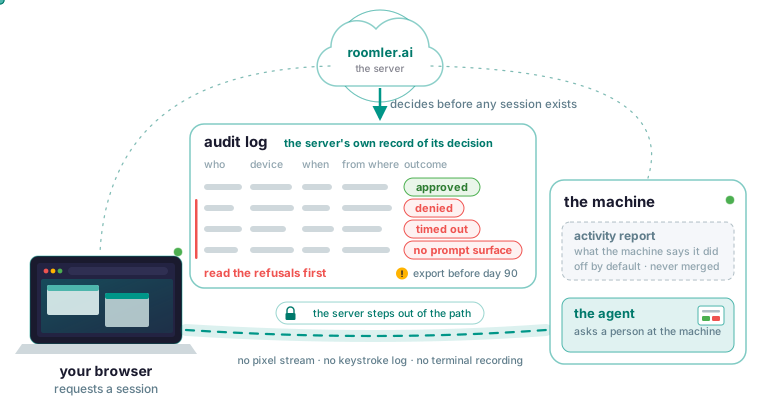
Who connected to a machine over Roomler, when, from where, and whether it was allowed is written by the server as its own record of the decision it made on that request. In the dashboard each remote-session row holds who connected, to which device, when, from where, and the outcome. Every refusal is written as well, with its reason: denied, timed out, or no prompt surface. Read the refusal rows first, and read the reason on each.
If you came here for event IDs 1149 and 4624
You have probably done the Windows work already: Event Viewer, event 1149 in TerminalServices-RemoteConnectionManager, 4624 with logon type 10 in the Security log, 21 to 25 in LocalSessionManager, then PowerShell or a SIEM. For RDP that is the right path, and on several points it is the better one. It is on the box, it costs nothing extra, it carries fields such as logon type, authentication package and source network address, and it is the only record of an RDP logon there is.
It stops at RDP. An agent-based remote desktop such as TeamViewer, AnyDesk or RustDesk never performs an RDP logon, so none of those events fires. The same holds for Roomler, where a session is a browser and the agent on the machine talking to each other once the server has introduced them. Even for RDP, a 1149 can appear when the logon afterwards fails, so the Windows log too has to be read as request versus outcome, and it lives on the machine, where anyone holding local administrator can clear it.
In Roomler the decision is made on the server before any session exists: at step 2 of how a session happens, the server checks your permissions, the organization’s settings and the device’s policy, and a refusal ends there, with a reason. The audit row is the server’s record of that decision, kept apart from anything the machine says about itself.
What is recorded, record by record
The consent and audit page lists seven records:
- Remote sessions: who connected, to which device, when, from where, and the outcome. Every session start, end and refusal is written.
- Command execution: every attempt including refusals, with the command and the result. Output is redacted for credentials before it leaves the machine. A remote command runs as the agent’s identity, SYSTEM on Windows and root under systemd, which is why this record matters.
- SSH decisions: every request, granted or refused, with the reason and the account mode.
- SSH activity: what the machine says it did, as sessions, commands and forwards.
- Network ACL decisions: what was allowed or denied, especially in warn mode. In warn mode every packet that would have been denied is logged and nothing is dropped. Step 5 of the worked example, switch to warn, work for a week, read the log, is the step people skip.
- Relay decisions: every grant and revocation.
- Organization events: membership, role and setting changes.
One record sits outside that table: a reusable enrollment key keeps a per-use record of who used it and when, and that record outlives the device, so a CI runner that enrolled with one leaves a trace even after it has deleted itself. Audit records are kept for 90 days.
Read the refusals first
A granted session is usually routine; a denied one, a permission that was missing, a consent that timed out, a forward a machine refused, is what an investigation is looking for, which is why every refusal is recorded with its reason. A remote-session request has four outcomes, and approved is the routine one. Denied means a person at the machine saw who was asking and what for, and refused; the controller was told it was a refusal rather than an error.
A timed out row says the prompt’s time limit expired unanswered; the session was refused and the controller was told the reason was a timeout. On a device in the “Ask, then fall back to the owner” mode, an unanswered prompt is handed to the device owner by email or push instead.
No prompt surface is the case where nobody could be asked. The agent tries a native panel on the machine’s desktop, then the tray or menu-bar companion, started on demand, then the command line, and if none is available it reports no prompt surface, logging which surface it used. GNOME and KDE on Wayland cannot show an arbitrary program’s overlay, so they fall through to the companion by design. The consent page records the history behind the distinction: before it existed, an unattended machine reported a timeout as a refusal, which sent people looking for a colleague who had never seen anything.
Not every denial comes from a human: a missing permission is refused at the server, at step 2, before the device is involved, and that row carries its reason too. If a script made the request, the error body carries the same reason that lands in the audit row, so the two can be matched. If a row sends you to disable a user, the security model lists a known gap: an access token already issued stays valid until it expires, and disabling a user does not end a session already in progress.
The dashboard has a section per record type, filterable by device, user and time. The unattended access page gives the reason to open it at all: “an audit trail nobody reads is a log file, not a control”.
Two records, never merged
The audit record is the server’s own decision, and it is authoritative. The activity report is what a machine says it did, and if that machine is compromised its report is whatever the attacker wants it to be. The two are joined by an identifier when you want the full story and kept apart so the story has attribution; folding them into one table would hide which is which. For SSH the split is explicit: the server writes the decision, and the machine writes a claim about sessions opened and closed, commands run and forwards attempted.
Activity reporting is a machine-side setting that defaults to off, so a machine that never reports looks exactly like an idle one, and an empty activity log is not evidence of inactivity. The troubleshooting index puts it the other way round: “an empty SSH activity log means reporting is off, not that nothing happened”.
The key is ssh_activity_log, default off, which the configuration reference describes as “whether this machine reports what its SSH sessions did”. It is device-owned, one of the settings the server cannot write. Read and change it with the CLI, which writes atomically and keeps a previous copy:
roomler config ls
roomler config set <key> <value>
The SSH settings are applied on restart, and the agent will not restart itself, so a freshly enabled report begins after you restart the agent or the machine reboots.
Who can read it
Audit records are readable by holders of the relevant audit permission, which is separate from the permission to perform the action. The permissions table names two: “View command audit” reads the record of remote commands, and “View SSH audit” reads the record of SSH decisions. View SSH audit is in the default administrator role while SSH itself is not, because reviewing who held a session is a different job from opening one. “Record remote screens” is left out of the default admin role for the same reason: watching a session is not keeping a copy of it.
A permission added in a release is not retroactive to an existing custom role, whose stored permission set stays what it was, so an administrator who cannot see a record type needs the role updated; only the owner role bypasses individual checks. And everything, audit included, is scoped per organization with no view that crosses them, so a machine enrolled in two organizations has two separate trails.
Export before day 90
Retention is 90 days and expiry is automatic. Audit records can be exported for retention beyond that or for an external SIEM, and the export has to happen before the window closes. Schedule it to land inside the window, into whatever system keeps your long-term records.
If you self-host, the server is yours, so what it holds sits on your own machine. Back up the database and the object store volumes, since the container is rebuilt from an image, and restore into a throwaway stack once to prove the backup works. A backup gets the server back; export is still what carries a row past day 90. Anyone scripting against the HTTP API should pin the server version they tested and read the release notes, because the API is not yet versioned and routes can change between releases.
What the machine’s own log adds
The agent logs which prompt surface the consent chain used. The reason text for a refused SSH port forward is also in that log and nowhere else: the client is told only whether it was policy or an unreachable destination, because the text names internal topology.
The diagnostics page gives the log command per platform. On Windows:
roomler logsThe service log directory under %PROGRAMDATA%\roomler\logs is the other place to read it. On macOS the user half and the root half each have a log:
roomler logs          # the user half
sudo roomler logs     # the root half
On Linux, the system unit or the per-user unit:
journalctl -u roomler -n 200 --no-pager           # system unit
journalctl --user -u roomler -n 200 --no-pager    # per-user unit
roomler logs has the agent resolve the path, which differs per process and platform.
Two cautions apply. roomler logs --grep searches a bounded slice of the end of the log, so a negative result is not proof of absence. And a log you export by hand has had no redaction pass. config.toml holds the agent token and, with SSH enabled, the SSH host private key, so it never goes into a ticket. If a token does end up in something shared, remove the device and re-enroll it, which revokes the credential. Machine names, mesh addresses and versions are generally safe and are usually the useful part. Never copy config.toml between machines either: identity is per machine, and a shared credential destroys the audit trail. When you read the two together, the machine’s log explains a refusal and the server’s audit row is the record of it.
What is never in the log, and why to say so before an audit
The server stores no pixel stream, no keystroke log, no terminal recording and no command output. Recording a terminal would mean shipping whatever an operator typed, a password into sudo, a credential into a database client, off the machine and into a system they do not control, so it is not offered as an option. Session metadata is audited in detail; contents are not. If your compliance regime requires session recording, that is a gap, by design, and it is better known now than discovered during an audit.
The absence is structural: the server introduces the two ends and then steps out of the path, so there is nothing for it to log even in principle, and a relay forwards ciphertext it cannot decrypt. Screen recording is a separate feature, off until both the machine’s owner and the organization allow it, and it is not an audit artefact.
The “what the server holds” table on the what the server sees page is the complete list of what can ever appear in an audit row. The “does not hold” list beneath it is what never will. See what the server can and cannot see: What the server sees.