
Open source Tailscale alternatives and the gaps each one has
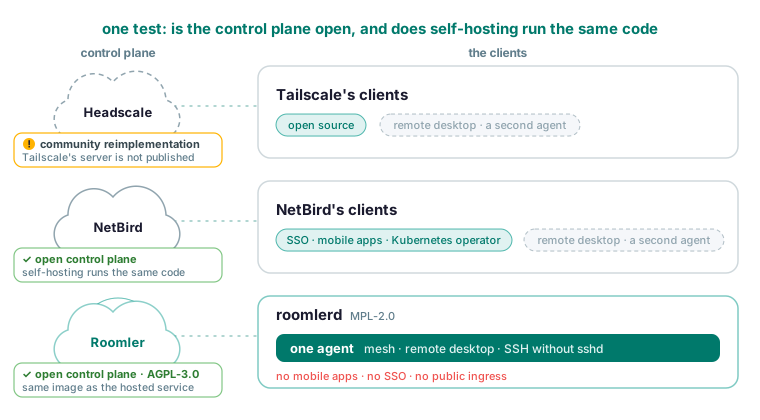
Headscale, NetBird and Roomler all let you host the control plane of a Tailscale-style mesh, and they differ on whose code you end up running. Headscale is a community reimplementation of a coordination server that Tailscale does not publish, so you run Headscale plus Tailscale’s clients. NetBird and Roomler open the whole control plane, and the server you self-host is the one the project itself runs. Roomler’s price for also being a remote desktop and an SSH server in the same agent is no mobile apps, no SSO or SCIM, and no public ingress.
Open-source client or open-source control plane
The alternative lists treat “open source” as one checkbox. It is two. Tailscale’s clients are open source. Its coordination server, the part that holds your accounts and hands each device its peer list, is not, and Headscale is a community reimplementation of it rather than the thing Tailscale runs. “Self-hosted Tailscale” therefore means Headscale plus Tailscale’s clients, with you maintaining a server that tracks a protocol it does not own.
That gives you one test for every product here: whether the project publishes the control plane it runs, and whether self-hosting runs that same code.
For Roomler the answer is yes on both counts. The server is AGPL-3.0 and the agent MPL-2.0. The image behind the hosted service is the image you run on your own box, with no feature held back. Self-hosting has no device limit imposed by Roomler.
The control plane is the right place to look because it is where trust sits in a mesh. It holds accounts, device rows, permissions and audit records, and it hands each machine the list of peers it may reach. It never carries plaintext: when no direct path exists, the relay forwards ciphertext it cannot read. Once the server is yours, what the server sees collapses into what your own machine sees.
The alternatives, and the gap in each one
Headscale reimplements the coordination server and uses Tailscale’s own clients. The gap is that you run and upgrade a server that tracks a protocol it does not own.
NetBird is an open control plane you can self-host as one supported stack, with SSO and IdP integration, mobile clients and a Kubernetes operator. The gap, per Roomler’s own NetBird page, is no remote desktop and no SSH without sshd, so seeing a screen means a second product with its own agent, control plane and permissions.
| Open control plane | Self-host runs the code the service runs | Mobile apps | SSO/SCIM | Public ingress | Remote desktop in the same agent | SSH on Windows without sshd | |
|---|---|---|---|---|---|---|---|
| Tailscale | No | No, community reimplementation | Yes | Yes | Yes | No | No, Unix only |
| Headscale | Community reimplementation | No, it reimplements Tailscale’s | No | No | |||
| NetBird | Yes | Yes | Yes | Yes | No | No | |
| Roomler | Yes, AGPL-3.0 | Yes | No | No | No | Yes | Yes |
The Tailscale and Roomler cells come from the side-by-side table on the Tailscale page, and the NetBird cells from the NetBird page. The comparison overview says each of these products is better than Roomler at the thing it was built for, and the NetBird page’s advice stands: if the requirement is an open-source Tailscale replacement with SSO, NetBird is the direct answer and you should evaluate it seriously.
What Roomler does not do
- There are no mobile apps, and because the agent runs on Windows, Linux and macOS and the viewer is Chromium-first, a phone or an iPad cannot drive a remote desktop.
- Sign-in is a password or OAuth through Google, GitHub, Microsoft, LinkedIn or Facebook, with no SSO and no SCIM.
- Tunnels reach into your network from your own devices and never publish a service to the internet, so there is no public ingress.
- There is no Kubernetes operator either.
- It is young, without Tailscale’s operational record.
- User sessions are not individually revocable, and there is no password-change flow yet.
- Network ACLs are feature-complete but not yet widely exercised in enforcing mode.
- The compose stack runs a single API instance and has no automatic TLS.
- On macOS the mesh needs a second, root enrollment, so a fully featured Mac appears as two devices.
Roomler’s own Tailscale page states the rule: if your problem is purely a private network between your machines and none of these differences matter to you, Tailscale is an easy recommendation.
The mesh, feature by feature against Tailscale
Every machine gets a stable private address in each organization plus a name, so ssh dev-box or http://build-server:8080 work instead of numbers, and a rename in the dashboard propagates across the mesh.
Two machines pick a path from a ladder: the same LAN, a direct internet path, a hole-punched path, a relay, and then a floor over TLS on port 443 that always connects. Both ends measure what works before choosing, a relayed pair never stops trying for a direct path, and a better path is established before the old one is dropped, so a live session is not interrupted.
Agents need outbound TCP 443 and outbound UDP, and nothing inbound, so no router needs a port forward. That also answers the office that blocks UDP: with only outbound 443 allowed, everything still works over the TLS relay, and allowing outbound UDP is what makes direct paths possible.
An exit node takes two parties on purpose: the device offers, and an administrator approves. The paths carrying the mesh and the control connection are pinned first, and if they cannot be, the whole change is withheld, so nothing is ever half-applied.
A subnet router advertises a range, an admin approves it, and every other device can then reach that range through the advertising machine. Advertise the narrowest range that covers what you need.
A network ACL rule names a source by device, tag, user or group, and a destination by device, tag or address range, and it is enforced at both ends. An unreadable policy denies. Roll out Off, then Warn, then Enforce, because Warn logs every packet that would have been denied without dropping it.
Ephemeral nodes enroll with a reusable key that carries an expiry, revocation, a use limit and a per-use record, so a CI runner joins, works and removes itself.
One machine can belong to several organizations with one agent and several enrollments.
The two commands you will use every day:
roomler status    # this machine: address, name, and how it is connected
roomler peers     # everything else on the mesh, and how each one is reached
The first prints this machine’s address, name and connection, and the second lists every peer with its address and the path carrying it, so a pair sitting on a relay stands out. For that relayed pair, two more commands explain it:
roomler why <peer>
roomler netcheck
why shows the ladder for one peer, which tiers were eligible and whether a hold-down is overriding the ranking, and netcheck reports this machine’s reachability, relay verdict, floor health and NAT class as measured.
What the same agent adds
roomlerd is at once the remote-desktop target, the mesh node, the tunnel endpoint and the SSH server, because the network adapter, the local control socket, the routing state and the updater each exist once per machine. That is also why a second copy of the agent is the wrong answer.
The machine you just reached over the mesh is already viewable as a live screen in a browser tab, under the same identity and the same audit trail. The controlling side installs nothing and needs a current Chromium browser. The session negotiates the fastest path that works, and the server never sees the contents.
Tailscale SSH does the same job on Unix. Roomler’s SSH also serves Windows, and it binds no port at all. Packets to the machine’s mesh address on the SSH port are intercepted below the socket layer, so nothing listens even locally and there is no sshd process for endpoint software to terminate.
ssh dev-boxSSH is off by default behind four gates: the organization’s switch, the user’s permission, the device’s policy, and the machine’s own configuration with an authorised key list. The server cannot write that last one. The SSH permission is not in the default administrator role.
Interactive shells, single commands, scp and sftp, and -L, -J and -D forwards all work. Remote forwarding with -R is deliberately not implemented, because it would make the machine bind a listening socket. The server keeps the decision, who asked for what and whether it was granted, and nothing of the session contents is ever stored. From the CLI, a session or a single command:
roomler ssh <device>
roomler exec <device> -- <command>     # <device>: device name, display name or hex id
Chat, rooms and video calls run on the same server and accounts. It is not a Slack replacement for a large organization, and there are no third-party app integrations.
Self-hosting the control plane, with the real commands
The lists show no self-host commands, so these are the self-hosting page’s, in its order. One container runs the API, the web app, the signalling plane, the chat and conferencing server and the relay floor, alongside MongoDB and MinIO. You need Docker with Compose v2, about 4 GB of RAM and 10 GB of disk.
git clone https://github.com/gjovanov/roomler-ai.git
cd roomler-ai
cp.env.selfhost.example.env.selfhost
Generate the secrets and keep the datastore passwords alphanumeric. A MongoDB or MinIO password containing @, :, /, ? or # breaks the connection URL it is interpolated into, and the failure looks exactly like a wrong password.
openssl rand -hex 32   # ROOMLER_JWT_SECRET
openssl rand -hex 32   # ROOMLER_TURN_SECRET
openssl rand -hex 24   # MONGO_ROOT_PASSWORD
openssl rand -hex 24   # MINIO_ROOT_PASSWORD
Pull before you bring it up. The service has a build section, so up -d on its own compiles the image from source, silently, and the wait looks like a hang.
docker compose -f docker-compose.selfhost.yml --env-file.env.selfhost pull
docker compose -f docker-compose.selfhost.yml --env-file.env.selfhost up -d
Then watch it come up:
docker compose -f docker-compose.selfhost.yml --env-file.env.selfhost logs -f roomlerImages are published for linux/amd64 and linux/arm64 and are anonymously pullable. Your server serves its own installers, and the script it hands out names your origin, so a machine enrolled from your instance enrols against your instance.
There is no automatic TLS, by design. Terminate it in nginx, Caddy, Traefik or a load balancer, and set the public origin exactly as browsers reach it, port included, so sign-in, invite links and the cross-origin policy agree. An origin missing its port gets you a refused websocket upgrade and an app whose realtime parts silently do nothing.
Conference media is the one part a proxy cannot fix, because browsers send it straight at the announced IP on a UDP port range. Set the announced IP and the RTC port range, and on Linux give the roomler service host networking and drop its ports block.
Upgrading is pull, then up -d, and state lives in the MongoDB and MinIO volumes, so those are what you back up.
The known limitations, in the docs’ words: single node, no automatic TLS, arm64 published but not yet run end to end, and the relay optional.
The server is AGPL-3.0 and the agent MPL-2.0, and running it for yourself, your family or your company is what the licence is for. LICENSING.md covers the split and what it means if you intend to offer it as a service. If you would rather not run a server, the hosted free plan covers three devices with the private network, remote desktop, tunnels, chat and calls included.
Which one to pick
- You need mobile apps, public ingress or enterprise SSO: Tailscale, or NetBird if it has to be open source with SSO. Roomler has none of the three.
- You want the most battle-tested mesh available: Tailscale.
- You must host the control plane yourself, on the code the project runs: Roomler or NetBird.
- You need a private network and remote desktop: Roomler, or you are running two agents forever.
- You are choosing a stack rather than a product: count the agents you will be running in a year.
Put two of your machines on one private mesh in a few minutes with the quickstart, whose last step is running roomler status and roomler peers on each machine and reaching one from the other by name.