
ZeroTier alternatives, and when Layer 2 still matters
- zerotier
- zerotier-alternative
- alternatives
- mesh-network
- self-hosting
- open-source
- remote-desktop
- tailscale-alternative
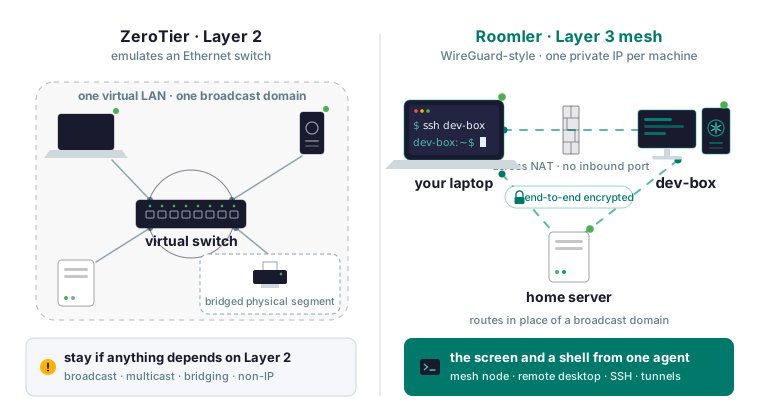
If anything you run depends on Layer 2, stay on ZeroTier or look at n2n. ZeroTier emulates an Ethernet switch: a network is a virtual Layer 2 LAN with broadcast and multicast, optional bridging to a physical segment, managed IPs you assign in the controller, and room for traffic that is not IP. Nearly every alternative on the top-5 lists, Roomler included, is a WireGuard-style Layer 3 mesh: one private IP per machine, routes in place of a broadcast domain, no bridging. For a homelab or a small team that usually covers it, and Roomler is the one on those lists that also serves remote desktop and SSH from the same agent.
What ZeroTier does that a WireGuard-style mesh does not
Ask yourself three questions first.
- Does anything you run discover peers by broadcast or multicast? LAN game lobbies, mDNS or Bonjour discovery, SMB network browsing, and some backup and media tools do.
- Do you bridge a physical segment into the virtual network?
- Do you run a protocol that is not IP?
Any yes means a Layer 3 mesh cannot carry what that thing depends on. Stay on ZeroTier, or look at n2n, which also emulates Layer 2. ZeroTier also has phone and tablet clients, packages for NAS boxes and routers, and years of production use.
If every answer is no, what the Roomler docs describe is a WireGuard-style encrypted mesh: each machine gets a stable private address and a name, talks directly to the others across NAT, and opens no inbound port. Traffic between two machines is encrypted end to end, with a WireGuard-style construction. The agent runs on Windows, Linux and macOS, and Roomler is young.
Addresses and names instead of a network ID
In ZeroTier you join a network ID, get authorised in the controller, and receive a managed IP from your pool. In Roomler you enroll a machine into an organization and it gets a private address that stays the same at home, in the office and on hotel Wi-Fi. The address is leased from a block that never overlaps another workspace’s. The machine also gets the name you chose at enrollment, and renaming it in the dashboard propagates across the mesh without touching the machines.
roomler status    # this machine: address, name, and how it is connected
roomler peers     # everything else on the mesh, and how each one is reached
The second is the diagnostic: it names every peer, its address, and the path currently carrying it. Names resolve on the machine itself, with one Linux caveat: it needs systemd-resolved, and when nothing asks it, roomler status says so.
Removing a device revokes its credential, tells every other node to forget it, and returns the address to the pool for the next joiner. A re-enrolled machine gets a fresh address, so if you pinned managed IPs in ZeroTier, pin names here, and update any bookmark, firewall rule or script that held the old address.
Subnet routers and exit nodes cover the usual reasons for wanting a flat LAN
The common reason for wanting Layer 2 was reaching things that never run an agent: a printer, a NAS, a hypervisor, a switch’s management page. That is a subnet router’s job: one enrolled, normally-on machine on that LAN advertises the range, an administrator approves it in the dashboard, and every device on the mesh then reaches the range through that machine. The two steps are separate on purpose, so advertising alone routes nothing. Advertise from one machine, since two advertising the same range do not load-balance, and pick a range that does not overlap the client’s own LAN: a laptop on 192.168.1.0/24 that starts routing 192.168.1.0/24 over the mesh has lost its own router. Approving a route makes it reachable; the network ACLs still decide who may use it. Then check from another device:
roomler status     # confirm you have the route
ping <an-address-in-the-range>
ZeroTier’s default-route setup maps to an exit node: set the overlay_exit_node_enabled key on the exit machine, have an admin approve it as an exit node in the dashboard, and name it in the client’s overlay_exit_node key. Both are written with:
roomler config set <key> <value>All of the client’s IPv4, IPv6 and DNS traffic then goes through that machine, and DNS is answered from the exit’s vantage point. Linux can be an exit from a system install, for IPv4 and IPv6; Windows only on Pro or Enterprise, IPv4 only, through Hyper-V NAT, and never on Home; a Mac from the root half.
The paths carrying the mesh and the control connection are pinned first, and if they cannot be, the change is withheld entirely. It still reroutes replies to inbound connections, including a plain SSH session you are configuring it from, so work from a console you cannot lose or over the mesh, which is exempted. It is not anonymity, since traffic leaves from your own machine with your IP, and it is not per application. On the hosted service exit nodes come with a paid plan; self-hosting has no plan limits at all. Prefer a subnet router when you can; moving the default route is a much bigger change than adding one range, and it fails more visibly.
How two machines find each other, and how to see the path
ZeroTier hole-punches and relays through its roots too; what Roomler adds is a per-pair verdict you can read. The ladder runs same LAN, direct across the internet, hole-punched (the common case), relayed through a relay that only sees ciphertext, and a floor over TLS on port 443 when every UDP path is blocked. The choice comes from measuring what works, with a NAT-type classifier used only as a hint. A pair that fell to a relay keeps re-attempting a direct path permanently, and upgrades are make-before-break, so a live session is not interrupted.
No machine needs a port opened or forwarded: agents need outbound TCP 443 and outbound UDP. With outbound 443 alone everything still works, with every pair relayed, which is usually why a machine works everywhere except one office. Three commands show it:
roomler peers
roomler why <peer>
roomler netcheck
The first lists each peer with the path carrying it, and the remote-desktop window shows the same as a LAN / Direct / Relay indicator. The second explains one peer: which tier was eligible, what it scored, and whether a hold-down is overriding the ranking. The third reports this machine’s reachability, relay verdict, floor health and NAT class as measured.
The common surprise is two machines on the same physical network showing Relay for days while every surface reports fine, usually because a VPN client on one end captured the local range the mesh uses. Disconnect the VPN on one end and watch the pair converge to direct within a minute.
An organization relay is one of your own machines acting as the relay for the others. That is the one inbound port anywhere: UDP 3478, on that machine only, and only if you enable relaying on it.
One machine in several networks
ZeroTier users routinely join one node to several networks, and most alternatives break that habit. Roomler’s analogue is one agent with several enrollments: a machine can be in more than one organization at once. Each hands it a separate address from its own block and a freshly generated cryptographic identity, so the machine cannot be correlated across workspaces by its public key. Each organization gets its own adapter on Windows, Linux and macOS.
The first enrollment is the primary, and host-global settings follow it alone: software updates, exit-node routing, DNS steering and anything that binds a port, none of which a secondary organization’s admin can change. Exit-node roles are primary-organization only.
Do not install a second copy of the agent: the two copies fight over the one adapter, the local control socket, the routing and firewall state, and the updater. Adding a second organization means minting a token there and enrolling the same agent again, and the connection does not start until the agent restarts, which nothing tells you. The tell is a last-seen time in the new workspace that never moves past the device’s creation time while the machine is online elsewhere.
roomler status # connection AND mesh state, per organizationAn organization can be connected with its mesh off, so status prints both on one line, and such an organization is still named in roomler peers. If a second organization has no mesh, turn it on in one of two modes and restart the agent: netstack needs no privileges and prints the SOCKS5 address for programs to use; tun gives a real adapter on a system install. To leave a secondary organization, remove the device in that organization’s dashboard; the primary is untouched.
The screen and a shell come from the same agent
With ZeroTier, Tailscale, NetBird or Headscale you get the machine onto a network and still need VNC, RDP, RustDesk or TeamViewer to see its screen, each with its own agent, control plane and permissions. Roomler’s daemon is at once the mesh node, the remote-desktop target, the tunnel endpoint and the SSH server, so a desktop session, a port forward and a shell share one enrollment, one access model and one audit trail. It is one process because path selection and the remote session want the same measurements, the SSH server sits inside the packet path the mesh owns, and a machine has one adapter and one updater.
Remote desktop opens the machine as a live screen in a browser tab with nothing installed on the viewing side, Chromium recommended. The session takes the same ladder, and the server never sees the contents.
SSH is a real shell by mesh name on a machine that runs no sshd, binds no port and needs no firewall rule, Windows included, because the agent diverts packets for its mesh address below the operating system’s socket layer.
ssh dev-boxInteractive shells, commands, scp and sftp, and -L, -J and -D forwards work; -R is deliberately not implemented, because it would make the machine bind a listening socket. SSH is off by default behind four independent gates: the organization’s switch, the user’s permission, the device’s policy, and the machine’s own configuration with an authorised key list. A tunnel forwards a local port to a service a remote agent can reach, with nothing exposed to the internet. The NetBird compare page’s advice applies: if you are choosing a stack rather than a product, count the agents you will be running in a year.
Self-host the control plane on the same code
Roomler’s server is AGPL-3.0 and its agent is MPL-2.0. The same code that runs the hosted service runs on your own box. Tailscale’s coordination server is not open source, and Headscale is a community reimplementation. Nothing is held back from a self-hosted deployment, and it has no plan limits. It is one container with the API, web app, signalling, chat and conferencing server and relay floor, plus MongoDB and MinIO.
git clone https://github.com/gjovanov/roomler-ai.git
cd roomler-ai
cp.env.selfhost.example.env.selfhost
Fill in .env.selfhost and generate the secrets with the openssl lines on the self-hosting page, then pull before you bring it up:
docker compose -f docker-compose.selfhost.yml --env-file.env.selfhost pull
docker compose -f docker-compose.selfhost.yml --env-file.env.selfhost up -d
The order matters: the service has a build section, so up -d alone compiles the image from source, silently. Your server serves its own installers, so a machine enrolled from it enrols against your origin. There is no automatic TLS, by design; terminate it in nginx, Caddy or Traefik and set the public origin in the environment. The mesh, tunnels, SSH and remote desktop work through anything; conference media does not, because browsers send it straight at a UDP range the server advertises. Two stated limits: the compose stack runs a single node, and arm64 images exist but the whole stack has not yet been run end to end on arm64. On your own server, what the server sees becomes what your own machine sees.
When to stay on ZeroTier, and when another option fits better
Stay on ZeroTier if anything depends on Layer 2 broadcast, multicast or bridging, if you run a protocol that is not IP, if phones or tablets are nodes, if a NAS or router runs the ZeroTier package, or if you want the longest production record for a mesh.
Pick NetBird for SSO or SCIM provisioning, a Kubernetes operator, mobile clients, or the most polished open-source self-hosted coordinator. Pick Tailscale for public ingress, the widest platform coverage, enterprise identity, or the most battle-tested mesh. Headscale gives you Tailscale’s clients on a community reimplementation of the coordinator. Pick Roomler if you want the network, the screen and a shell from one agent, if you must host the control plane on the real code, or if you need SSH on Windows with no sshd.
Roomler’s gaps: no mobile apps, no SSO or SCIM, no public ingress, no Kubernetes operator, an agent only on Windows, Linux and macOS, and it is young. Tailscale and NetBird are each better than Roomler at the thing they were built for; neither puts the network and the screen on one agent.
Put two of your machines on one private mesh in a few minutes with the quickstart, whose last step ends with the same status and peers commands.